
Appearance
Web page
Web page (called Iframe before 10.00) embeds another page in the report, such as a map service, a form or an internal portal.
Set the address
- In Components → Assists, click Web page, then click the canvas.
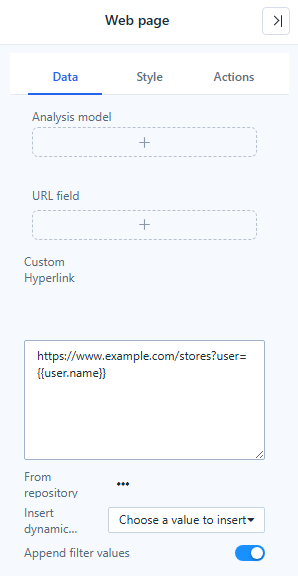
- On Data, set the address in one of three ways:
- Custom Hyperlink: type the URL.
- From repository: pick a file or report from the repository.
- Analysis model and URL field: take the address from data.
- Insert dynamic value appends a value such as
{{param.Region}}to the address; values are URL-encoded. See Dynamic Values. - Append filter values (on by default) adds the selections of linked filters as
field=valueto the address.
The page reloads when parameters or filters in the address change. Only http, https and relative addresses are used.
Style → Web page behavior
| Setting | Default | What it does |
|---|---|---|
| Auto refresh | 0 (off) | Reloads the page every 5–600 s in the report. Skipped while the browser tab is in the background. |
| Scroll bars | Auto | Hidden removes the page's scroll bars. |
| Allow full screen | On for new components | Lets the embedded page go full screen. |
| Click through | Off | Clicks pass to the components below, for example when the page is only a background. |
Actions
Visibility, and Events → Pre-change, a script that can change the address before the page loads.
If the page stays blank
Many sites refuse to be embedded, or need their own sign-in. The browser then shows its own error page inside the frame; after 20 s without loading the component says The page did not load: the address may be invalid, or the site does not allow embedding. Use an Open link click action on a button instead.