
Appearance
Cross-Filtering
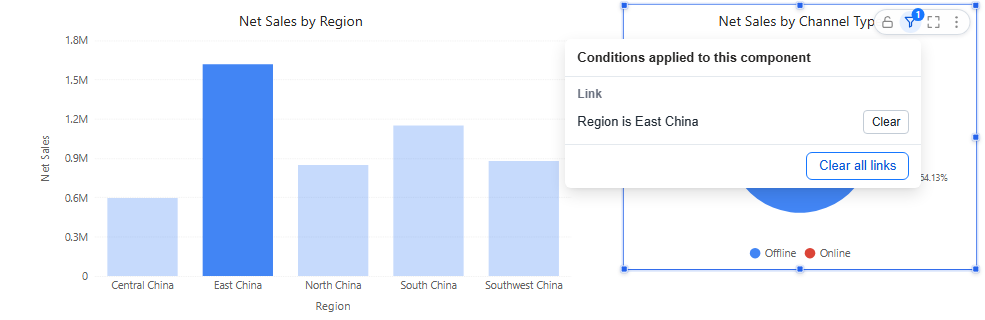
Clicking a data point filters the components linked to the chart: click East China in a sales-by-region chart and the channel pie shows East China only. The clicked chart keeps its data and highlights the selection.
Set it up
- Select the source chart and open Actions → Interactions → Linked components.
- Choose the components that should follow the clicks.
- Check Page → Settings → Interaction → Enable chart interactions (on by default). It turns cross-filtering on or off for the whole page.
Cross-filtering also works in the editor, so you can test it without previewing.
Clicking rules
| Action | Result |
|---|---|
| Click a point | Filters the linked components by that point only. Selections in other charts are cleared. |
| Ctrl+click (Cmd on a Mac) | Adds to the selection. Points in the same chart are combined with OR, selections in different charts with AND. |
| Click the selected point again, or blank space in the chart | Cancels the selection. |
| Right-click → Filter other charts | Same as a click. |
| Change any filter component | Clears all chart selections. |
In a table, a click highlights the clicked row only. In a decomposition tree, click a selected node again to cancel; the root's Clear selection cancels links in other components.
See and clear link conditions
A component filtered by a click shows a blue funnel with a count in its toolbar: Conditions applied to this component. Click it to see the conditions grouped by source:
| Group | Contains |
|---|---|
| Link | Clicks on other charts. Each has Clear; Clear all links removes them all. Links created by drilling are listed but cannot be cleared here. |
| Filter | Filter components on the page, such as a Date or Dropdown. |
| Passed in | Values from the URL or from a drill-through. |
| Own | The component's own filters (Data → Filters). |
When a link leaves no rows, the component says No data under the current link conditions and offers Clear links.
Components on another model
A click on a chart from model A filters a component on model B only by the fields that exist in model B. If none of the clicked fields exist there, the component is not re-queried. See Cross-Model Analysis.
For an explicit choice readers can see, use a filter component instead.
Related: Drill Down · Linking and Cascading Filters