
Appearance
LLM Configuration
LLM configuration has three layers:
| Layer | What it controls |
|---|---|
| Model profile | Provider connection, model ID, API key, and request parameters. |
| Assignment | The profile used by each Agent stage and by the embedding system role. |
| Scheme | A reusable snapshot of profiles and assignments. |
1. Open LLM configuration
- Click AI Agent in the left navigation, directly below Home.
- Click LLM in the top toolbar.
The LLM panel is available to administrators in the full AI Agent view. It opens on Assignments and shows the current scheme and assignment status.
Datafor 10.00 has 15 Agent stages and one Embedding Model role: 16 assignments. 16/16 assigned means that every role has a compatible profile and every chat profile has current structured-output verification. It is not a continuous provider-health check.
After an upgrade to 10.00
The stage Model Resolution is new in 10.00. While it has no assignment of its own, it runs on the Workflow Routing profile, and Assignments shows that profile in its row, so an upgraded installation still reads 16/16 assigned. Clicking Save records it as the stage's own assignment; choose a different profile first if you want one. You only have to assign it by hand when Workflow Routing is unassigned as well.
2. Create and enable a model profile
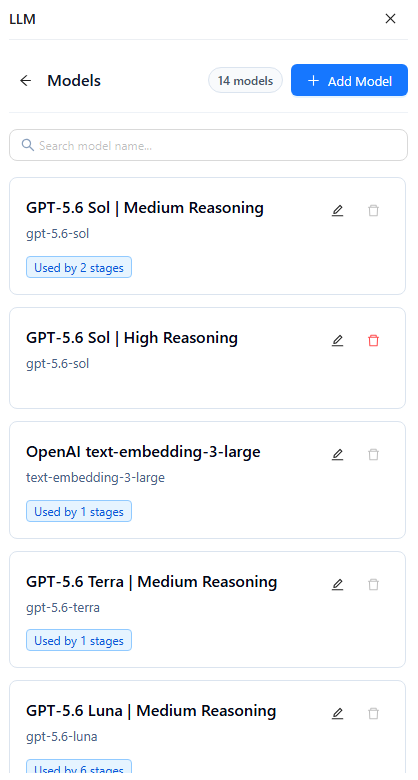
From Assignments, click Manage models →, then click Add Model.
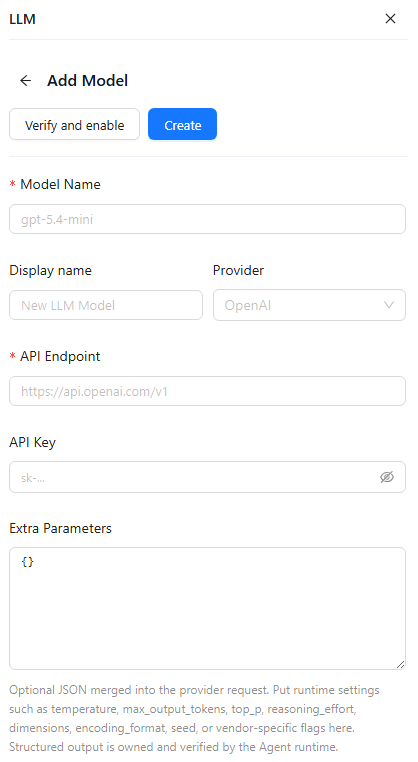
| Field | Required | Description |
|---|---|---|
| Model Name | Yes | Exact provider model ID used at runtime. |
| Display name | No | Label shown in model lists and assignment selectors. |
| Provider | No | Endpoint preset and provider identifier. Options are OpenAI, Qwen, DeepSeek, Gemini, Anthropic, and Custom; OpenAI is the default. |
| API Endpoint | Yes | HTTP(S) provider base endpoint. |
| API Key | To verify | Required by Verify and enable. When editing, leave it blank to keep the saved key. |
| Extra Parameters | No | Valid JSON object merged into the provider request. The default is {}. |
For Agent stages, use an OpenAI Responses or OpenAI-compatible Chat endpoint. A provider appearing in the menu does not guarantee that its native API is compatible; Verify and enable is the acceptance check.
The form has no capability selector. A new profile is classified as an embedding profile when its model ID, display name, or description contains embed or embedding; otherwise it is classified as chat. Prefer a supplied scheme or import file when you need an explicitly defined capability.
Correct activation order
- Click Create for a new profile, or Update after editing an existing profile.
- Open the saved profile and click Verify and enable.
- Wait for the live provider verification to succeed.
- Assign the profile to the required stages.
Verification of an unsaved draft is not retained. Changing the provider, model ID, endpoint, API key, or effective request parameters clears the previous verification; save the change and run Verify and enable again.
For chat profiles, verification checks real structured output against the provider. It is not a local ping and can make multiple provider calls. Unverified chat profiles cannot be assigned to Agent stages.
3. Configure Extra Parameters
Use Extra Parameters only for provider request settings such as temperature, max_output_tokens, top_p, reasoning effort, embedding dimensions, encoding_format, seed, or vendor-specific flags.
The value must be a JSON object. Do not put credentials, authorization headers, endpoints, response_format, tools, tool_choice, or structured-output controls here; the runtime removes those keys. Do not set both reasoning_effort and thinking_budget.
Parameter shape depends on the adapter. For example, OpenAI Responses uses {"reasoning":{"effort":"medium"}}, while an OpenAI-compatible Chat endpoint may use {"reasoning_effort":"medium"}.
4. Manage model profiles
Model cards show the display name, provider model ID, assignment usage, missing-key status, and structured-output verification status.
- Structured output not verified: save the profile, then run Verify and enable.
- Used by n stages: reassign those stages and save before deleting the profile.
- No API key: edit the profile and provide a key before verification.
Saved keys are masked in the UI and API. Leaving the API Key field blank while editing preserves the saved key.
5. Assign models to runtime stages
Return to Assignments. All 16 rows must be assigned before Save is enabled.
| Assignment | Runtime key | Used for |
|---|---|---|
| Workflow Routing | workflow.routing | Choosing the governed workflow for the request. |
| Model Resolution | model.resolution | Choosing the analysis model for a request that names none, from the user's visible models and the Metrics Library bindings (Auto-select model in the AI Assistant, and MCP calls without a model). |
| Semantic Binding | semantic.binding | Checking business meaning against model implementation. |
| Semantic Draft | semantic.draft | Producing the semantic query draft. |
| Analysis Strategy | analysis.strategy | Planning a bounded multi-step investigation. |
| Investigation Step Query | analysis.investigation_step_query | Generating the governed query for one investigation step. |
| Evidence Analysis | analysis.evidence | Interpreting query results as evidence-backed findings. |
| Follow-up Suggestions | analysis.follow_up | Proposing bounded next questions. |
| Investigation Observation | analysis.investigation_observation | Normalizing one investigation result into an observation. |
| Investigation Replan | analysis.investigation_replan | Deciding whether the investigation plan needs adjustment. |
| Investigation Synthesis | analysis.investigation_synthesis | Producing the final answer from investigation evidence. |
| Model Brief | model.brief | Summarizing model metadata and analytical capabilities. |
| Dashboard Review | dashboard.review | Analyzing the supplied dashboard context. |
| Question Suggestions | model.question_suggestions | Generating model-grounded sample questions. |
| Failure Explanation | workflow.failure_explanation | Wording a failure that the workflow has already decided. |
| Embedding Model | retrieval_embedding | Vector search, metadata retrieval, and semantic matching. |
Agent-stage selectors list verified chat profiles. The Embedding Model selector lists embedding profiles. A profile can be reused across multiple stages.
Click the Save button at the top of Assignments after any change. Assignment changes are not saved automatically. Saved assignments are read for each subsequent stage call and do not require a service restart. A required stage does not fall back to an old model ID or an unassigned spare profile. The one exception is Model Resolution: while it has no assignment of its own (see the note in section 1), it uses the Workflow Routing assignment.
Models configured in Datafor
Questions in the AI Assistant use only the assignments on this page. A few features fall back to a model configured in Datafor when their stage has no assignment, for example dashboard insight, the model brief and sample questions. For users who are not administrators, that fallback works only when the AI Agent and the Datafor server share the same secret. See AI Agent Shared Secret.
6. Use schemes
Current scheme records the template that was last applied or saved. Later manual assignment changes do not rename it, so the scheme name is not proof that the live configuration still matches the template.
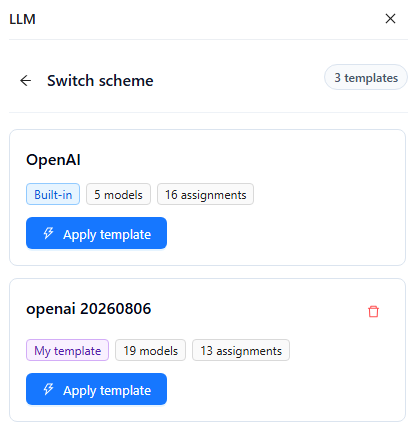
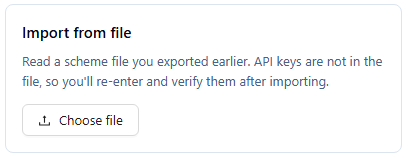
Use the controls as follows:
- Top Save: saves the live stage and system-role assignments.
- Save scheme → Save current configuration: saves the current profiles and assignments as a custom template.
- Save scheme → Export to file: downloads the current profiles and resolvable assignments as JSON.
- Switch scheme: applies a built-in or custom template, or imports a previously exported JSON file.
Save live assignments before saving a scheme. Schemes and exports never contain API keys.
When applying a scheme, review the stage changes, enter the provider API key, and change the shared endpoint only if the deployment uses a gateway or proxy. Datafor creates or overwrites profiles referenced by the scheme, verifies them, and writes assignments last; unrelated profiles are untouched. If verification is incomplete, assignments can remain pending. Return to Assignments, resolve any warnings, confirm 16/16 assigned, and click Save.
After importing, add the missing API keys and run Verify and enable on the saved profiles before saving assignments. A scheme saved or exported before 10.00 has no Model Resolution assignment; applying it sets that row to the scheme's Workflow Routing model. Check the row afterwards if you want a different model for it.
If a scheme changes the Embedding Model, rebuild the knowledge index of every data model immediately: click Rebuild index for each index on Settings › AI Agent › Knowledge indexes. An index built with the previous embedding model is not compatible with the new one.
7. Verify the configuration
- Confirm 16/16 assigned with no verification warning.
- Click the top Save button.
- Open New Chat, select an analysis model, and confirm that its brief and suggested questions load.
- Run a representative analytical question that exercises routing, query generation, and answer synthesis.
- Click New Chat, leave Auto-select model selected, and ask a question that names a metric. The answer card should name the model it was answered from.
| Symptom | Action |
|---|---|
| A model is absent from an Agent-stage selector | Confirm it is a chat profile, save it, and run Verify and enable. |
| Structured output not verified | Check provider access, endpoint, API key, model ID, and parameters; then verify the saved profile again. |
| The Assignments Save button is disabled | Complete all 16 rows and resolve every compatibility or verification warning. |
| Model Resolution is empty | Workflow Routing is unassigned too. Assign a verified chat profile to both, then click Save. |
| A previously assigned stage becomes unavailable after a profile edit | Save the profile and rerun Verify and enable; verification is tied to the effective runtime configuration. |
| Imported assignments remain pending | Add API keys, verify imported chat profiles, review all roles, then click Save. |
| Retrieval fails after changing the Embedding Model | Click Rebuild index for every knowledge index, so that each is rebuilt with the new embedding profile. |
| Non-administrators get model errors in dashboard insight or sample questions, administrators do not | Assign the stage in question here, or set up the shared secret: AI Agent Shared Secret. |