
Appearance
Relative Date Filtering
A relative period, such as Last Month or Year to Date, is computed from the viewer's current date each time the report opens or refreshes, so the report never needs a manually updated date.
You can use relative periods in three places:
| Where | Setting | Use it for |
|---|---|---|
| Date component | Default value → Relative | A date range or period that readers can still change. |
| Dropdown, List box, Button group, Radio/Checkbox on a year, quarter, month, week or day field | Default value → Relative | Preselecting the current or previous period in a member list. |
| Component filter | Data → Filters → +, then Filter type → Relative | A fixed rule on one chart, such as the last 12 months. |
Presets
Each preset name means one exact range:
| Group | Presets (range selection) |
|---|---|
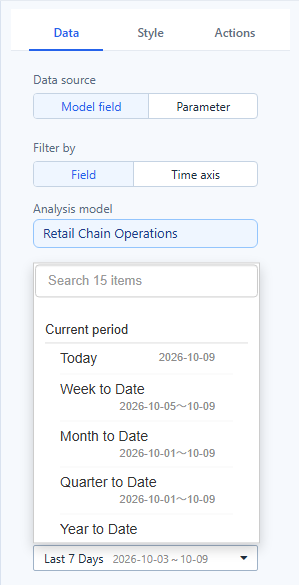
| Current period | Today, Week to Date, Month to Date, Quarter to Date, Year to Date, This Year to Last Month |
| Recent | Yesterday, Last 7 Days, Last 15 Days, Last 30 Days, Last Month, Last 2 Months, Last 6 Months, Last 365 Days |
| Calendar months and years | This Month, This Quarter, This Year to This Month, Last 2/3/6/12/24/36 Calendar Months, This Year, Last Year, Last 2/3/10 Years |
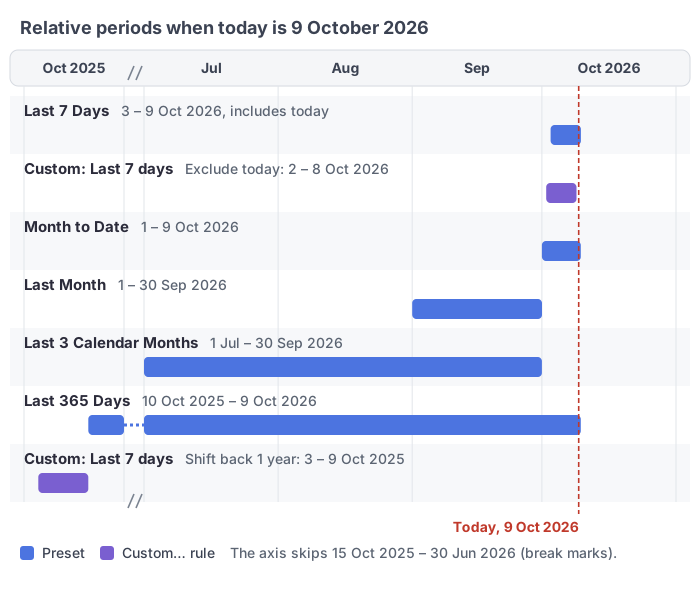
- Last N days, months or years include today: on 9 October 2026, Last 7 Days is 3–9 October and Last 365 Days is 10 October 2025 – 9 October 2026.
- Last N Calendar Months are whole calendar months, while Last 365 Days is a rolling window; Month to Date is the current month up to today. Check the range shown next to each preset.
- The list in the Date component shows the range each preset resolves to today, so you can check it before saving.
Custom rules
At the end of every relative list, Custom… builds a rule from parts:
- Direction: Last, Next or This for a range; Current, Back or Ahead for a single period.
- Number and unit: 1–9999 days, weeks, months, quarters or years, never finer than the field.
- Rolling (exactly N units back from today) or Calendar (whole units); not offered for days, which always count back from today. For This: To date or Whole period.
- Include today / Exclude today (or the current week, month… for calendar units).
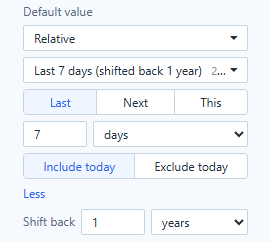
- More → Shift back: move the whole range back, for example the last 7 days, one year ago.
Examples:
| Question | Rule |
|---|---|
| The last three full months | Last · 3 · months · Calendar · Exclude current month |
| The same month last year | Back · 12 · months (single period) |
| The last 7 days a year ago | Last · 7 · days · Include today · Shift back 1 year |
Things to check
- No data yet. A relative period after the last loaded date returns no data. In a list filter the period is shown in red with a strikethrough and still applied; charts say No data under the current filters, and View conditions shows the range.
- Weeks start on the day set in Settings › General › System configuration › Modeling › First day of the week.
- Older reports: Last 7 Days and the other Last N presets cover one day less than before 10.00, and Last Year, Last Month, Last Quarter, This Year to Last Month and Year to Date were corrected for edge cases.
- URL values win: a default passed in the URL replaces the relative default on the first load.
Related: Date · Dropdown, List Box, Button Group and Radio/Checkbox · Time Semantics and Default Time Settings