
Appearance
Monitoring and Limits
This page is for administrators. Settings › Notifications › Subscriptions & alerts shows everyone's subscriptions, alerts and paginated report subscriptions, every run, and the settings that apply to all of them. It has six tabs; the tab is part of the address (#/settings/notify-ops?tab=alerts), so a reload keeps it.
Overview tab
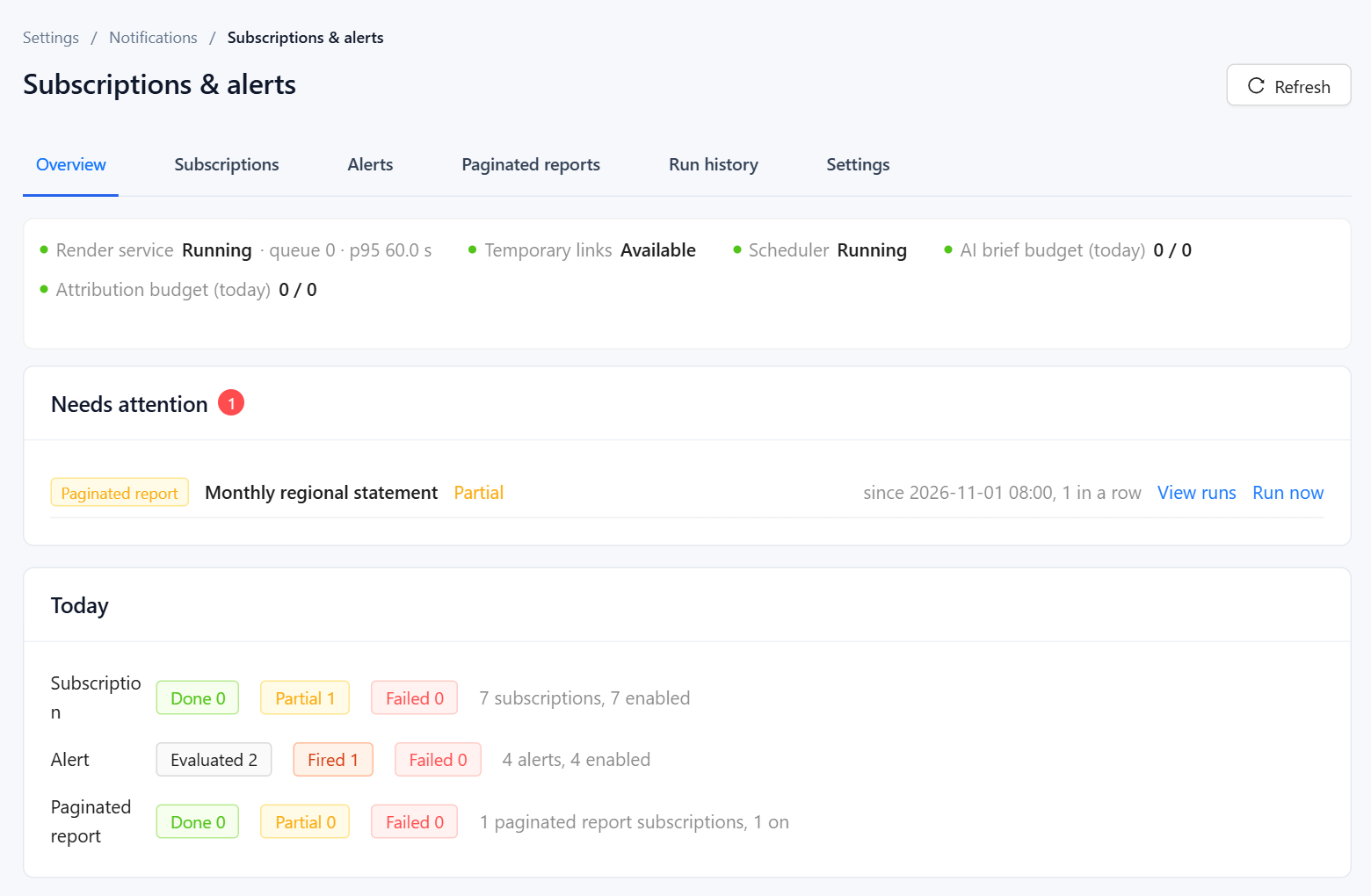
- Status line. Render service (running or not, the queue and the 95th-percentile render time), Temporary links (Available, Blocked or Disabled), Scheduler, and today's use of the AI brief budget and Attribution budget. A failing item turns red and explains itself; a budget turns orange at 80% and red when used up.
- Needs attention lists only the subscriptions and alerts whose latest run still failed or ended partial, with the reason, since when and how many times in a row. Once a later run succeeds, the item disappears. View runs opens its history; Run now or Evaluate now tries again.
- Today counts today's runs by result. Click a number to open Run history filtered to it.
When Scheduler is not running, nothing scheduled will run; check pentaho.log and restart the server.
Subscriptions, Alerts and Paginated reports tabs
Everyone's objects, with filters by owner and by report (or by model for alerts). Each row has the owner, schedule, next run and last result, an Enabled switch, and Run now (Evaluate now for alerts), Runs and Open report. To change the content of someone's subscription, open the report and edit it from its Subscribe drawer, where administrators see all subscriptions of that report.
Run history tab
All runs of all three kinds in one list, newest first. Filter by type, status, date, object or owner. Click a name to open that object's runs with their details, described in Run history. Runs are kept for the retention period below.
Settings tab
The settings here take effect immediately, without a restart. Save each group separately.
Delivery: system time zone, default delivery, merge renders and temporary links, described in Setting Up Delivery.
Quotas:
| Setting | Default | Notes |
|---|---|---|
| Subscriptions per user | 20 | For Creators. Administrators have no limit. |
| Subscriptions per Reader | 5 | Readers can subscribe only for themselves. |
| Recipients per subscription | 50 | People, after roles are expanded |
| Alerts per user | 20 | For Creators. Administrators have no limit. |
| Restricted alerts per Reader | 5 | 0 turns restricted alerts off |
| Daily AI brief budget | 200 | AI briefs per day for the whole site; 0 turns briefs off. Runs after the budget is used up go out without a brief. |
| Daily attributions | 50 | AI analyses of alerts per day for the whole site; 0 turns them off |
The AI brief and the alert analysis do not count against anyone's personal AI quota; these two budgets limit them instead. See also AI Operations and Quotas.
Message templates: see Message templates.
Retention and maintenance:
| Setting or action | Effect |
|---|---|
| Retention (days) | How long runs and generated files are kept; 90 by default. Cleanup runs every day at 03:00. |
| Clean up now | Deletes runs and files older than the retention period immediately. |
| Rotate system token secret | Regenerates the key the plugin uses to open reports as each recipient. Runs in progress may fail, so do it when nothing is running. |
Other limits
The plugin's settings.xml, in pentaho-solutions/system/datafor-notify/, holds the remaining limits. Changes need a restart.
| Key | Default | Meaning |
|---|---|---|
run-concurrency | 2 | Subscriptions running at the same time |
run-timeout-minutes | 10 | Time for one run, all recipients included |
render-concurrency | 2 | Pages sent to the render service at the same time |
render-timeout-seconds | 120 | Time for one page to render |
insight-timeout-seconds | 150 | Extra time allowed for the AI brief |
mail-attachment-max-mb | 25 | Above this, emails carry links instead of attachments |
im-file-max-mb | 20 | Largest file uploaded to an IM |
asset-link-max-days | 30 | Longest Link validity an administrator can set |
alert-eval-concurrency | 2 | Alerts evaluated at the same time |
alert-query-timeout-seconds | 60 | Time for one alert query |
alert-max-members | 200 | Members checked by Check separately |
attribution-timeout-seconds | 180 | How long an alert waits for its AI analysis |
webhook-timeout-seconds | 10 | Timeout for robot and webhook calls |
channel-rate-per-minute | 18 | Messages per minute per robot |
render-url | http://127.0.0.1:38082 | Address of the render service |
public-base-url | empty | Prefix for links in messages; empty means Site address |
output-dir | empty | Where definitions, runs and files are stored; empty means pentaho-solutions/system/datafor-notify-output |
Subscription and alert definitions, runs and generated files are plain files under the output directory, one folder per tenant. Make sure your server backups include that folder.
Audit log
Creating, editing, deleting, enabling and running subscriptions and alerts, silencing alerts, channel changes and tests, settings changes and token rotation can be recorded in the Audit Log under the Subscriptions & alerts group. Individual deliveries are not audited; they are in the run history.