
Appearance
Creating Hierarchies
A hierarchy gives report authors a defined drill path inside one Dimension, such as Category L1 → Category L2 → Product. Put levels in broad-to-detailed order and use Attributes that describe the same business entity.
Create a hierarchy
- Open the Analysis Model and expand the required Dimension.
- Open an Attribute's Actions menu and select Create hierarchy.
- Select the new hierarchy and replace its generated Caption with a business-facing name.
- Optionally add a Description and set Hide if the hierarchy is not ready for report authors.
The selected Attribute becomes the first level. The initial caption follows the pattern <attribute>_hierarchy until you rename it.

Add and order levels
To append another Attribute, open its Actions menu and select Add to hierarchy, then choose the target hierarchy. The item appears only after the dimension has at least one hierarchy; for the first one, use Create hierarchy.
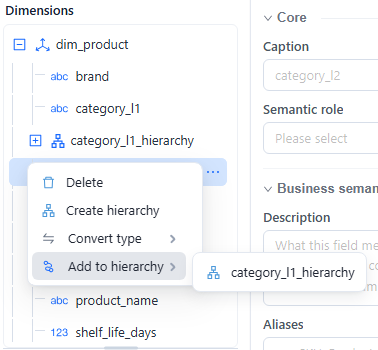
You can also drag Attributes and levels in the Dimensions tree:
- Drag an Attribute onto a hierarchy to insert it as the first level.
- Drag an Attribute onto a level to insert it after that level.
- Drag an existing level within its hierarchy to reorder it.
An Attribute can appear only once in the same hierarchy. Attributes and levels cannot be moved between Dimensions, and an existing level cannot be moved directly to another hierarchy.
Check the final order from broadest to most detailed. In this example, Product Hierarchy drills from Category L1 to Category L2 and then Product.

Maintain a hierarchy
- Select the hierarchy to edit its Caption, Description, or Hide state.
- Select a level to edit its caption and description. Its source Attribute is read-only.
- Use Delete on a level or hierarchy to remove it. Deletion is immediate in the editor and does not delete the source Attributes.
- Click Save after validating the hierarchy.
After renaming, reordering, or deleting levels, test one report that uses the hierarchy. For report controls and reset behavior, see Drill Down.
Time hierarchies
For a time hierarchy such as Year → Quarter → Month → Day, each source Attribute needs a time level. Set it with the Attribute's Semantic role, or from the same Actions menu with Convert type → Date → Year, Quarter, Month, Week, Day, or Datetime, and set a matching Source column format. See Time Semantics and Default Time Settings.