Appearance
Embedding Reports Using XDM
Note: The term "report" in this document refers to the visual reports created using Datafor or the Visualizer plugin.
A report opened in an iframe (or in a window opened with window.open) accepts filter messages from the host page through XDM (cross-document messaging, the browser's postMessage API). The report applies the filters to its charts, which re-query their data without reloading the page.
Typical uses:
- Passing filters when the report opens, so the first data shown is already filtered.
- Changing filters in the host application later and passing them to the report (without reloading it).
How it works
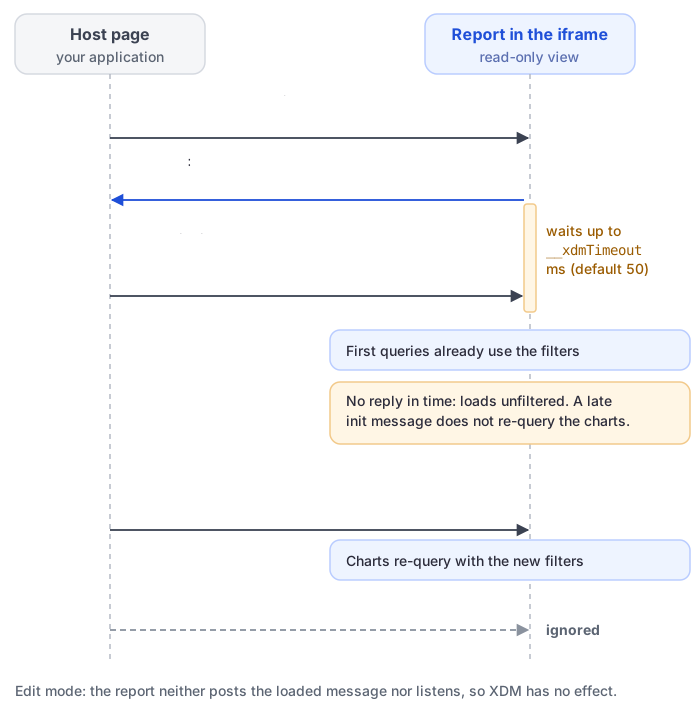
- XDM works only in read-only views: the open and embed URLs and share links. A report opened in edit mode ignores XDM messages.
- When the report has loaded, it posts
{"event":"visualizerReportFileLoaded","id":"<id>"}to its parent window (or opener). Every message the host sends must carry thatidastrustMark; messages with another or notrustMarkare dropped. - The report waits for an initial filter message (
init: true) before it queries data. By default it waits only 50 ms; add__xdmTimeout=<milliseconds>to the report URL to wait longer. After the wait it loads unfiltered, and a lateinitmessage no longer re-queries the charts. Messages withoutinitare applied at any time. - XDM filters only narrow the data the signed-in user may see. They are not a security control: anyone who can open the report can send other messages from the browser console. Use row-level security to restrict data per user.
Steps
Add the XDMWorker class to the host page
Add the following XDMWorker class to the page that embeds the report. It records the report's id and sends filter messages with its send method.
class XDMWorker {
    constructor({ onPageInitEvent = () => { } }) {
        this.reportId = null;
        window.addEventListener('message', (msg) => {
            const { data } = msg;
            let reportMessage;
            try { reportMessage = JSON.parse(data); } catch (d) { }
            if (reportMessage) {
                if (reportMessage.event == 'visualizerReportFileLoaded') {
                    this.reportId = reportMessage.id;
                    onPageInitEvent();
                }
            }
        });
    }

    send(data, target, init = false) {
        if (!this.reportId) {
            console.error('No reportId found, please wait for the report to be loaded');
            return;
        }
        const message = {
            trustMark: this.reportId,
            event: 'query',
            init,
            filters: data,
        };
        target?.postMessage(JSON.stringify(message), '*');
    }
}
Scenario 1: Filter the report when it opens
Create an XDMWorker before the report loads
To filter the first load, call
sendinsideonPageInitEvent, with the third argument set totrue.Example:
const xdm = new XDMWorker({
    onPageInitEvent: () => {
       iframeRef?.current && xdm.send(
               [
                  {
                    value: [
                      'product_family_1',
                      'product_family_2'
                    ],
                    name: '[product_class].[hierarchy_product_family].[product_family]',
                    type: 'name',
                    datatype: 'string'
                  }
               ],
               iframeRef.current?.contentWindow,
               true
           );
    }
});
Filter format: an array of filter objects. Several objects filter together (AND).
[{ name: string, // uniqueName of the field's level value: [ string | [from, to] , ... ], // values and ranges type: 'name' | 'caption' | 'uniqueName', // default 'name' datatype: 'string' | 'numeric' | 'timestamp', // default 'string' exclude: boolean // default false }]- name: the
uniqueNameof the field's level in the report's analysis model, see below. - type: what the values are compared with:
name(member name, default),caption(displayed name), oruniqueName(each value is a full member unique name, such as[product_class].[product_family].[Drink]). - datatype: how values and range bounds are compared.
- exclude:
truekeeps everything except the given values or ranges. - value: single values and ranges can be mixed; the conditions are combined with OR (with AND when
excludeistrue). A range is an inner array[from, to]. Each bound is a value, or an object{"i": "1" | "0", "v": value}whereiis"1"to include the bound (default) or"0"to exclude it.
Condition Filter x in ('a', 'b', 'c') {"value":["a","b","c"],"datatype":"string"}x not in ('a', 'b') {"value":["a","b"],"datatype":"string","exclude":true}x >= 1 and x < 3 {"value":[[{"i":"1","v":"1"},{"i":"0","v":"3"}]],"datatype":"numeric"}x between 2 and 5, or between 4 and 6 {"value":[["2","5"],["4","6"]],"datatype":"numeric"}x between 2 and 5, or between 4 and 6, or x in (7, 8) {"value":[["2","5"],["4","6"],"7","8"],"datatype":"numeric"}x >= '2024-01-01 00:00:00+8' and x < '2025-01-01 00:00:00+8' {"value":[[{"i":"1","v":"1704038400"},{"i":"0","v":"1735660800"}]],"datatype":"timestamp"}Each row also needs
name(andtypewhen it is notname). The field does not have to be used by the charts: a filter on a field that a chart does not show still filters that chart's data.- name: the
Open the report in the iframe
- Use the report's embed URL, see Report URLs.
- Add
__xdmTimeoutso the report waits long enough for your first message, for examplehttp://your-server:28080/datafor/plugin/datafor/api/integrate/L2hvbWUvYWRtaW4vZXhhbXBsZTEuZGF0YWZvcg==?__xdmTimeout=150. Set it to how fast your page answersvisualizerReportFileLoaded. It is not needed if you don't filter the first load.
Scenario 2: Change filters after the report has loaded
Call send without the third argument whenever the host's filters change. The report applies the filters and re-queries its charts immediately.
send(message, target)- message: filters in the format above.
- target: the
contentWindowof the iframe that shows the report.
Find a field's uniqueName
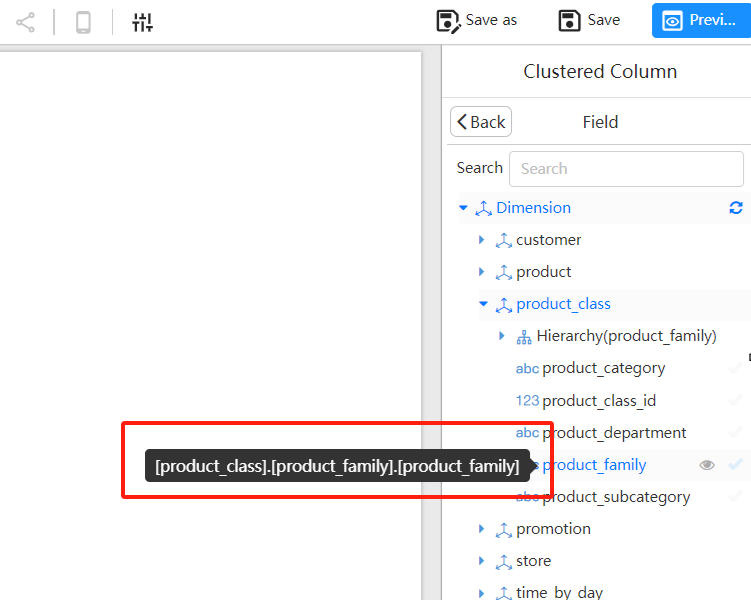
In the report designer, hover over a field in the field list: the tooltip shows its uniqueName.
The uniqueName of the product_family field in the image below is [product_class].[product_family].[product_family].
Example
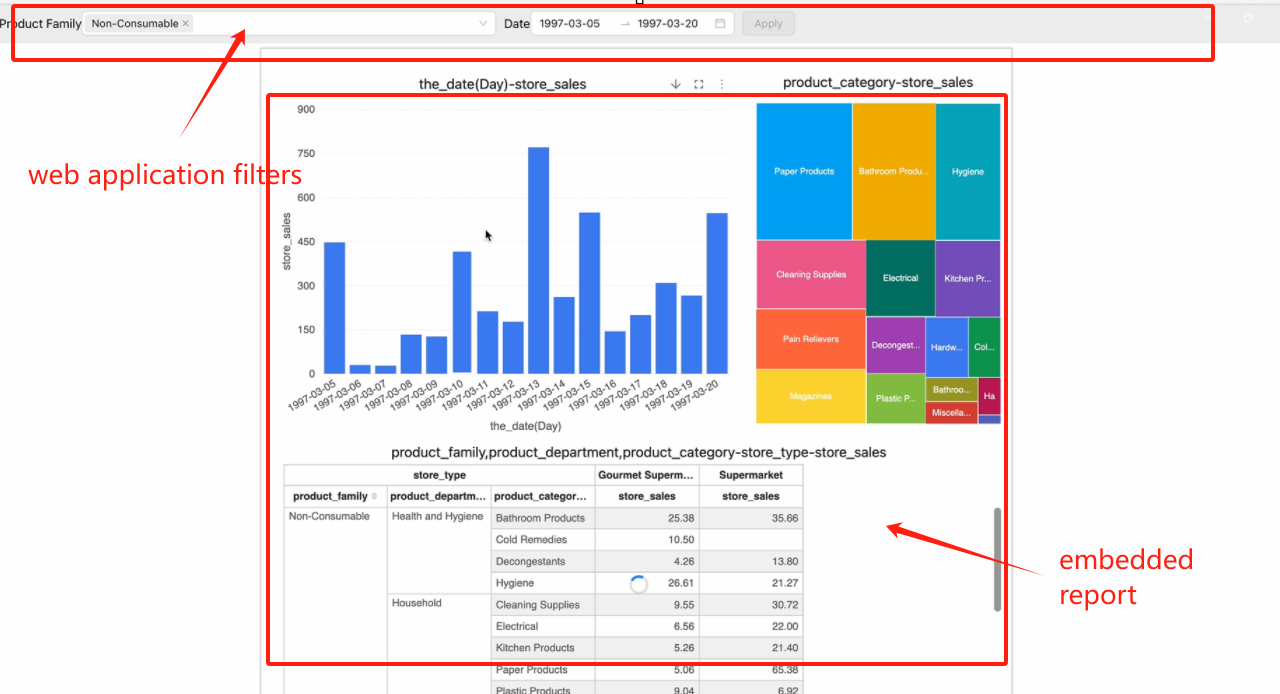
A host page with its own filters (top) driving an embedded report: