
Appearance
Dropdown, List Box, Button Group and Radio/Checkbox
The four list filters show the members of one field and filter their linked components by the selection. They share the same Data settings and differ in how the members are displayed.
| Component | Shows members as | Search | Typical use |
|---|---|---|---|
| Dropdown | A drop-down box | Yes | Region, product, store: many members, little space. |
| List box | A scrolling list | Yes | A list readers should always see, such as Member Tier. |
| Button group | A row of buttons | No | Two to six values, such as Online / Offline. |
| Radio/Checkbox | Radio buttons or check boxes | No | A few values with a clear on/off look. |
Set up the data
- Add the filter from Components → Filters.
- In Data, keep Data source → Model field, check the Analysis model and choose the Field.
- Choose the Default value (below), and whether readers can pick several values (Multiple selection) and an All item (Show 'All').
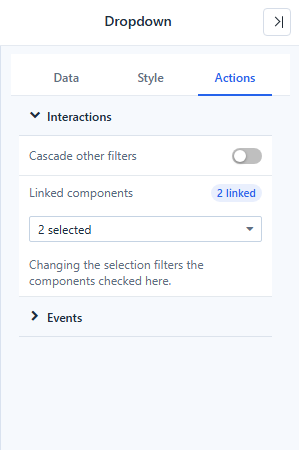
- In Actions → Interactions, check the components under Linked components. The badge shows how many are linked, for example 2 linked.
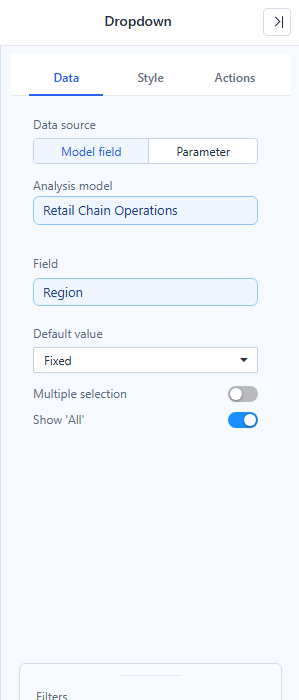
To make the filter set a parameter instead of filtering by a field, choose Data source → Parameter. See Bind Filters to Parameters.
Default value
| Type | On a time field (year, quarter, month, week, day) | On any other field |
|---|---|---|
| Fixed | The members you pick. | The members you pick; pick none to start with All. |
| Relative | A period such as This Month, Last Month or Same Month Last Year, or a Custom… rule. | First or Last member. |
| Parameter | The current value of a parameter (Parameter name). | Same. |
A relative period is recalculated from the viewer's current date every time the report opens or is refreshed. Linked components get a date range, even when the member list has not been loaded.
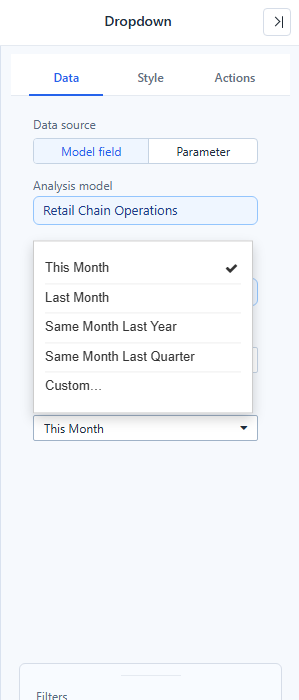
The relative choices follow the field's level:
| Level | Choices |
|---|---|
| Year | This Year, Last Year, The Year Before Last |
| Quarter | This Quarter, Last Quarter, Same Quarter Last Year |
| Month | This Month, Last Month, Same Month Last Year, Same Month Last Quarter |
| Week | This Week, Last Week |
| Day | Today, Yesterday |
Every list ends with Custom…, where you set Current / Back / Ahead, a number and a unit, for example 12 months back for the same month last year. See Custom rules.
If the computed period has no member in the data, it is still applied and shown in red with a strikethrough; see Values that are no longer in the data.
Selection rules
- Multiple selection off: one value at a time. With Show 'All' off the filter always has a value; when it is emptied it takes the first item.
- Multiple selection on: ticking every member collapses to All when Show 'All' is on.
- Members are sorted numerically where they are numbers, so months read 1, 2 … 12 rather than 1, 10, 11, 12, 2.
- Date-time members are shown without the
00:00:00.0part.
Search and long lists
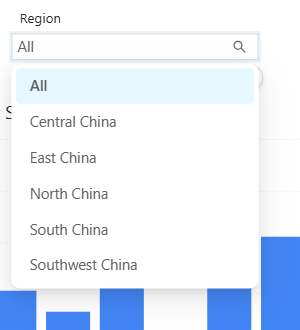
Dropdown and List box can show a search box (Style → Search). The list loads at most 1,000 members; typing searches all of them on the server. See Long member lists.
In a List box, the search filters as you type (it waits while an input method is composing), and the result scrolls to the top.
Interactions and events
| Setting | Where | What it does |
|---|---|---|
| Linked components | Actions → Interactions | The components this filter filters. |
| Cascade other filters | Actions → Interactions | One switch that adds every other filter on the same model to Linked components (loops and parameter-bound filters are skipped). See Linking and Cascading Filters. |
| Value changed | Actions (Dropdown, List box) | A script function changedEvent(value, old) that runs after the selection changes. An empty array means All. |
Component-specific settings
Dropdown
- The × in the box clears the selection (when clearing is allowed).
- Content alignment and Control size keep the box at a fixed height when you resize the component.
List box
- Style → List box → Selected background color (default transparent) and Selected text color.
- Keyboard: the list is one Tab stop; the arrow keys, Home and End move the focus; rows that are not loaded yet are loaded as you move.
- On open, the list scrolls to the selected value, for example a relative default of Yesterday far down a day list.
Button group
- New button groups use Same size: equal widths, up to six buttons per row. Long names can be cut; widen the component or use a Dropdown.
Radio/Checkbox
- A tooltip with the full name appears only when a name is cut off.
When a chart ignores the filter, a value shows in red, or a member cannot be found, see Diagnose an unexpected result.
Related: Filters · Date · Relative Date Filtering