
Appearance
AI Agent Shared Secret
Datafor returns the full configuration of an LLM configured in Datafor, including its provider API key, only to administrators and to callers that present the shared secret in the X-Datafor-Agent-Secret request header. Everyone else, including users who are allowed to use that model, gets a copy without api_key, apiKey and extra_params (which can hold custom authentication headers).
The AI Agent reads model configurations with the signed-in user's session. It therefore needs the same secret as the Datafor server: without a matching value, features that use an LLM configured in Datafor fail for users who are not administrators.
This guide applies to Datafor 10.00 and later. The value is called DATAFOR_AGENT_SECRET on the AI Agent side and <agent-secret> in Datafor's settings file.
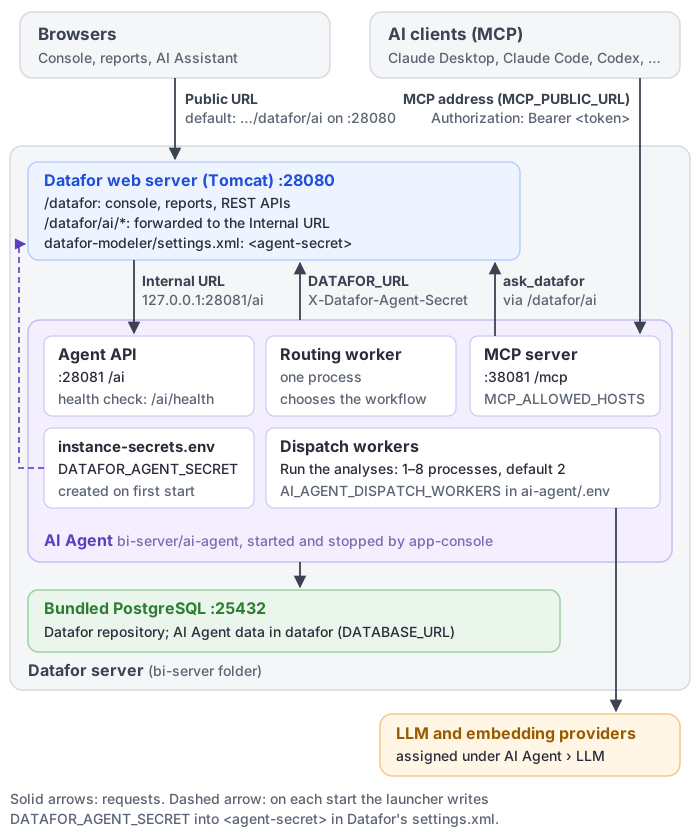
1. Who is affected
The questions you ask on the AI Agent page use the model profiles assigned to the Agent stages on the LLM page (see LLM Configuration) and do not depend on the secret. Some features fall back to an LLM configured in Datafor when their Agent stage has no assignment, and only those need it:
- AI insight on dashboards (stage Dashboard Review);
- the model's welcome brief and sample questions (stages Model Brief and Question Suggestions), including the MCP tool
generate_sample_questions; - metadata trimming for large models.
Administrators are never affected. Keep the secret in place even when every stage is assigned, so that a later change to the assignments does not break these features for other users.
Signs that the secret is missing or does not match:
- Administrators can use these features, other users get model errors.
- The AI Agent logs in
ai-agent/logscontainget_llm_config_by_id: Datafor withheld the api_key of LLM <id>. The same line also appears when the LLM configuration in Datafor simply has no API key. - The Datafor log
tomcat/logs/pentaho.logcontainsAI service secret is not configured. Datafor logs this once per start, at the first request for an LLM configuration, and only when no secret is set on the Datafor side at all. A value that differs from the AI Agent's produces no Datafor warning.
2. Automatic setup: AI Agent beside Datafor
The AI Agent's launcher manages the secret when two conditions hold:
- Co-located layout. The AI Agent folder sits directly beside Datafor's
pentaho-solutionsfolder, as in the packaged layoutbi-server/ai-agent. The launcher looks for../pentaho-solutions/system/datafor-modeler/settings.xmlrelative to its own folder; any other location, including a deeper folder insidebi-server, counts as a split deployment (section 3). - Started with the launcher.
app-console.batorapp-console.shin the AI Agent folder, which Windows also runs frombi-server/start-server.batandbi-server/ai-start.bat. If the AI Agent executables are started another way, for example registered directly as services, nothing is generated or synchronised.
What the launcher does on every start
- Finds the value, first match wins:
- a non-empty
DATAFOR_AGENT_SECRETin.envin the AI Agent folder. The AI Agent processes load.envover everything else, so this is the value they present to Datafor. It is used as it is and not copied intoinstance-secrets.env; DATAFOR_AGENT_SECRETininstance-secrets.envin the same folder;- an
<agent-secret>with a value outside comments in Datafor'ssettings.xml, for example one an administrator set by hand. The launcher adopts it and copies it intoinstance-secrets.env, so Datafor keeps its value; - otherwise it generates a new value: 43 characters of letters, digits,
-and_, stored ininstance-secrets.env.
- a non-empty
- Writes the value into Datafor's
settings.xml. It replaces the<agent-secret>element that is outside comments, or adds one before</settings>if there is none. The commented-out example in the shipped file is left alone, the rest of the file (encoding, byte-order mark, line endings) is unchanged, and the file is not touched when it already holds the value. - Starts the AI Agent, then the MCP server, so that the MCP server reads the current value. All AI Agent processes and the MCP server use it.
The launcher prints what it did in the console where it runs (with start-server.bat, the Datafor server console):
| Event | Windows | Linux |
|---|---|---|
| New value generated | generated DATAFOR_AGENT_SECRET in instance-secrets.env | Generated in instance-secrets.env: DATAFOR_AGENT_SECRET |
| Value adopted from Datafor | took DATAFOR_AGENT_SECRET from Datafor's settings into instance-secrets.env | Took from Datafor's settings into instance-secrets.env: DATAFOR_AGENT_SECRET |
settings.xml updated | set <agent-secret> in <path>; Datafor reads it when it starts, so restart the BI server if it is already running | the same text, starting with Set |
settings.xml could not be written | could not set <agent-secret> in <path> : <reason> | Could not set <agent-secret> in <path>: <reason>. Set it by hand to this service's DATAFOR_AGENT_SECRET, or start this service as a user that can write the file; until then users who are not administrators cannot use Datafor-configured models. |
.env and instance-secrets.env hold different values | DATAFOR_AGENT_SECRET in .env differs from the one in instance-secrets.env; this service uses the .env value, so that is the one given to Datafor. Keep it in one of the two files only. | the same text |
Datafor's settings.xml not found | Datafor's datafor-modeler settings.xml is not beside this AI service: set its <agent-secret> to DATAFOR_AGENT_SECRET from instance-secrets.env so that users who are not administrators can use Datafor-configured models. | the same text |
The generated line may list other per-installation secrets as well. On Linux, <reason> names the cause, for example that the file has no <agent-secret> element and no </settings> to add one before, or that the user running the launcher cannot write it. When settings.xml cannot be written, the AI Agent still starts; fix the cause, or set the value by hand as in section 3.
When Datafor needs a restart
Datafor reads settings.xml once, when it starts. A value written while Datafor runs takes effect at its next restart.
| How you start | Restart Datafor? |
|---|---|
Datafor with bi-server/start-server.bat (Windows) | No. The script runs ai-agent\app-console.bat start before Tomcat, so the value is in place, also on the first start after an upgrade. |
The AI Agent on its own while Datafor runs (ai-start.bat, app-console start or restart) | Only if the launcher printed set <agent-secret> in …. If it printed nothing about <agent-secret>, the value was already there. |
| Linux, or Datafor started another way (for example as a service) | Check whether your Datafor start-up runs the AI Agent launcher before Datafor. If it does not, restart Datafor once after the launcher has printed Set <agent-secret> in …. |
Keep the value in one place
- In a co-located installation, do not also set
DATAFOR_AGENT_SECRETon the Datafor side as an environment variable or a JVM option. Datafor prefers those tosettings.xml, and the launcher neither reads nor updates them. If you need one, give it exactly the same value. - Do not define
DATAFOR_AGENT_SECRETin bothai-agent/.envandinstance-secrets.env. If the two differ, the.envvalue wins and the launcher prints the "differs" warning on every start.
3. Split deployment: configure by hand
Configure the secret by hand when the AI Agent runs on another server, or in a folder that is not directly beside Datafor's pentaho-solutions folder. The launcher then prints the "settings.xml is not beside this AI service" message on every start.
Before you begin
- Get access to the server accounts that manage both installations. Console administrator access alone does not give access to server files.
- Start the AI Agent once with
app-console.bat start(Windows) or./app-console.sh start(Linux), so that the value exists. - Plan a short maintenance window: Datafor has to be restarted.
Copy the value from the AI Agent server
- In the AI Agent folder, check
.envfirst. If it has aDATAFOR_AGENT_SECRET=line with a value, that value is the one in use. - Otherwise open
instance-secrets.envand find the line that starts withDATAFOR_AGENT_SECRET=. - Copy the text after
=.
If neither file has it, the AI Agent is older than 10.00 or was not started with its launcher.
Treat the value like a password. Move it over a secure channel, and do not paste it into email, chat or support tickets.
Warning
instance-secrets.env also holds the key that encrypts the model API keys stored by the AI Agent. Never delete or replace the whole file, keep it across upgrades and include it in backups.
Set the same value on the Datafor server
Use one of these forms. When more than one is set, Datafor uses the JVM option first, then the environment variable, then the settings file.
Option A: Datafor's settings file.
Open
bi-server/pentaho-solutions/system/datafor-modeler/settings.xml.If the file already has an
<agent-secret>element outside a comment, replace its value. Otherwise add one line just before</settings>:<agent-secret>PASTE-THE-VALUE-HERE</agent-secret> </settings>Save the file.
The shipped file contains a commented-out example, <!-- <agent-secret></agent-secret> -->. Leave it: a value inside <!-- --> is ignored.
Option B: an environment variable or a JVM option for the account or service that runs Datafor:
- environment variable
DATAFOR_AGENT_SECRET; - JVM option
-Ddatafor.agent.secret=<value>.
Restart Datafor
Restart the Datafor server with your usual procedure.
4. Verify
- Compare the values. The AI Agent's value is a non-empty
DATAFOR_AGENT_SECRETin.envif there is one, otherwise the one ininstance-secrets.env. Datafor's value is the JVM option if set, else the environment variable, else the<agent-secret>element outside comments insettings.xml. They must be identical. Do not share them while comparing. - Check that Datafor has been restarted since the value last changed.
- Optional functional test. It proves something only if a feature actually falls back to an LLM configured in Datafor, that is, if one of the stages in section 1 has no assignment. Asking questions on the AI Agent page never uses the secret. As a user who is not an administrator, use such a feature, then check that the AI Agent logs have no new
Datafor withheld the api_keyline.
5. Change the secret
Features for users who are not administrators fail until both sides match again, so use a low-traffic window.
Co-located installation:
- Delete the
DATAFOR_AGENT_SECRETline frominstance-secrets.envand the<agent-secret>element from Datafor'ssettings.xml. Also remove any Datafor environment variable or JVM option, and make sureai-agent/.envdoes not define the key. - Restart the AI Agent with
app-console.bat restartor./app-console.sh restart. The launcher generates a new value and writes it intosettings.xml. - Restart Datafor.
If you delete only one side, the launcher fills it in again from the other on the next start, and the old value comes back.
Split deployment:
- Delete the
DATAFOR_AGENT_SECRETline frominstance-secrets.env, and make sure.envdoes not define the key; otherwise no new value is generated. - Restart the AI Agent with
app-console.bat restartor./app-console.sh restart. - Copy the new value to the Datafor server as in section 3, then restart Datafor.
Use app-console restart without a target, so that the MCP server restarts too. app-console restart agent leaves the MCP server running with the old value.
6. Upgrades and moves
- AI Agent upgrade. Nothing to do as long as
instance-secrets.envis kept. - Datafor upgrade, co-located. An upgrade may replace
settings.xmlwith the shipped template. The launcher writes the value back on its next start; see section 2 for when Datafor needs a restart. - Datafor upgrade, split deployment. With Option A, open
settings.xmlafter each upgrade and add the<agent-secret>line again if it is gone, then restart Datafor. An operating-system environment variable is not affected by upgrades. A JVM option survives only if it is set somewhere a Datafor upgrade does not replace; check your start script after each upgrade. - One value per installation. Do not copy
instance-secrets.envor its values from one installation to another. - Moving the AI Agent next to Datafor. Once its folder sits beside
pentaho-solutions, the launcher keepssettings.xmlin step on every start. If you used Option B, remove the environment variable or JVM option, or keep it equal to the AI Agent's value, because it takes precedence over the settings file.
7. Troubleshooting
| Symptom | What to check |
|---|---|
Administrators are fine, other users get model errors, and the AI Agent log has Datafor withheld the api_key | The values differ (check .env first on the AI Agent side), Datafor was not restarted after the change, or a Datafor environment variable or JVM option overrides settings.xml. Compare as in section 4. If the values match, check that the LLM configuration in Datafor has an API key. |
| Users who are not administrators started failing after a Datafor upgrade (split deployment) | The upgrade replaced settings.xml. Add the <agent-secret> line again and restart Datafor, or switch to Option B. |
tomcat/logs/pentaho.log has AI service secret is not configured | No value is set on the Datafor side. Co-located: start the AI Agent with its launcher, then restart Datafor. Split: section 3. |
For the AI Agent connection settings of a separately installed AI Agent, see How to Enable the AI Feature.