
Appearance
Repository Separation Deployment Guide
Datafor keeps its repository (reports, models, users, permissions, schedules, AI Agent data) in the built-in PostgreSQL server on port 25432. This guide moves the repository databases to a PostgreSQL server you manage and points Datafor and the AI Agent to it. It works the same for an existing installation and for a new one: for a new installation, start Datafor once with the built-in database so that it initializes the databases, then follow the steps below.
Important: Take a full backup first (see Backup and Restore) and keep a copy of every file you edit in section 4.
1. What is moved
| Database | Account in the built-in setup | Used by |
|---|---|---|
hibernate | hibuser | jdbc/Hibernate in server.xml; postgresql.hibernate.cfg.xml |
quartz | pentaho_user | jdbc/Quartz (schedules) |
jackrabbit | jcr_user | jdbc/jackrabbit; Jackrabbit repository files (reports, models and other content) |
datafor | postgres | jdbc/datafor_modeler_auth; applicationContext-spring-security-jdbc.properties (users and roles); the AI Agent (DATABASE_URL) |
upload | upload | jdbc/datafor_repository |
The sample database foodmart is business data, not part of the repository. Move it only if your reports use it.
Keep business data on a separate server. Since 10.00, authors who are not administrators get SQL_FRAGMENT_FORBIDDEN or SQL_EXECUTE_FORBIDDEN when they write SQL views, conditions or expressions on a connection whose database account can reach the repository databases. Put business data on another PostgreSQL instance, or connect to it with a reporting account that has no rights on the repository databases.
2. Prerequisites
- A PostgreSQL server that the Datafor server can reach, preferably over a private network. Use a version at least as new as the built-in one; check it with
bi-server/pgsql/bin/postgres --version(Linux) orbi-server\postgresql\bin\postgres.exe --version(Windows). - A superuser account on that server for the steps below.
- Datafor and the AI Agent stopped (see the installation guide for your platform).
3. Copy the databases
3.1 Dump the built-in databases
Start only the built-in database and dump the five databases with the tools that come with it. On Linux, as biadmin:
cd /opt/bi-server
pgsql/bin/pg_ctl -D pgsql/data start
for db in hibernate quartz jackrabbit datafor upload; do
  pgsql/bin/pg_dump -h 127.0.0.1 -p 25432 -U postgres -Fc -f /tmp/$db.dump $db
done
pgsql/bin/pg_ctl -D pgsql/data stop
On Windows, in a Command Prompt in the bi-server folder:
postgresql\bin\pg_ctl.exe -D postgresql\data start
for %d in (hibernate quartz jackrabbit datafor upload) do postgresql\bin\pg_dump.exe -h 127.0.0.1 -p 25432 -U postgres -Fc -f %d.dump %d
postgresql\bin\pg_ctl.exe -D postgresql\data stop
3.2 Create the accounts and databases on your server
Connect with psql as a superuser, for example psql -h <database_host> -p <port> -U postgres -d postgres, and run the following with strong passwords of your own:
CREATE USER hibuser PASSWORD '<password-1>';
CREATE USER pentaho_user PASSWORD '<password-2>';
CREATE USER jcr_user PASSWORD '<password-3>';
CREATE USER upload PASSWORD '<password-4>';
CREATE USER datafor_owner PASSWORD '<password-5>';

CREATE DATABASE hibernate OWNER hibuser ENCODING 'UTF8';
CREATE DATABASE quartz OWNER pentaho_user ENCODING 'UTF8';
CREATE DATABASE jackrabbit OWNER jcr_user ENCODING 'UTF8';
CREATE DATABASE upload OWNER upload ENCODING 'UTF8';
CREATE DATABASE datafor OWNER datafor_owner ENCODING 'UTF8';
The built-in setup uses the superuser postgres for the datafor database. The example gives it its own owner, datafor_owner; Datafor and the AI Agent create and change their own tables in this database, so the account must own it.
Do not run the scripts in bi-server/data/postgresql/ against a server that already holds Datafor data: each of them starts with drop database if exists.
3.3 Restore the dumps
Restore each dump into its database, owned by the account from 3.2:
pg_restore -h <database_host> -p <port> -U postgres -d hibernate  --no-owner --role=hibuser       hibernate.dump
pg_restore -h <database_host> -p <port> -U postgres -d quartz     --no-owner --role=pentaho_user  quartz.dump
pg_restore -h <database_host> -p <port> -U postgres -d jackrabbit --no-owner --role=jcr_user      jackrabbit.dump
pg_restore -h <database_host> -p <port> -U postgres -d upload     --no-owner --role=upload        upload.dump
pg_restore -h <database_host> -p <port> -U postgres -d datafor    --no-owner --role=datafor_owner datafor.dump
4. Point Datafor and the AI Agent to the new server
In every file below, replace localhost:25432 or 127.0.0.1:25432 with <database_host>:<port> and set the account and password from 3.2. All paths are relative to bi-server.
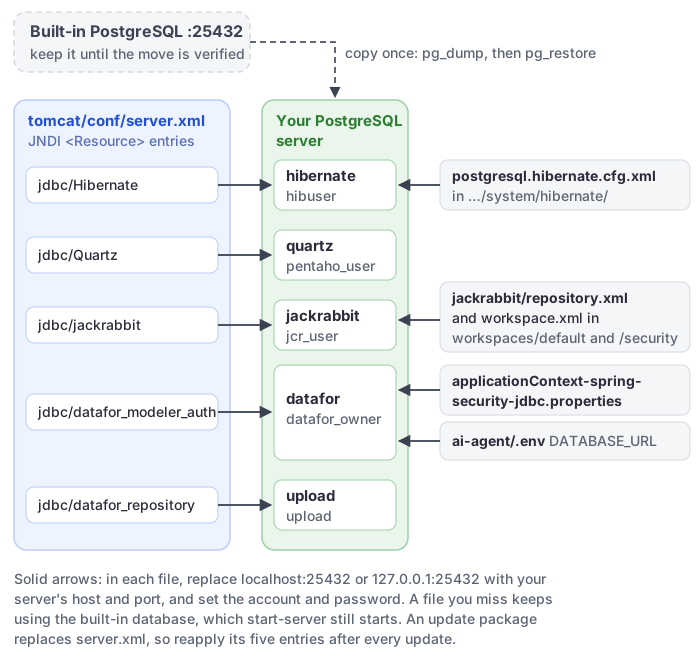
| File | What to change |
|---|---|
tomcat/conf/server.xml | In <Context path="/datafor" …>, the url, username and password of the five <Resource> entries: jdbc/Hibernate, jdbc/Quartz, jdbc/jackrabbit, jdbc/datafor_modeler_auth (database datafor) and jdbc/datafor_repository (database upload). Keep the ?stringtype=unspecified suffix of the last two URLs. |
pentaho-solutions/system/applicationContext-spring-security-jdbc.properties | datasource.url, datasource.username, datasource.password (database datafor). |
pentaho-solutions/system/hibernate/postgresql.hibernate.cfg.xml | connection.url, connection.username, connection.password (database hibernate). |
pentaho-solutions/system/jackrabbit/repository.xml | The six jdbc:postgresql://localhost:25432/jackrabbit URLs and the jcr_user password next to each. |
pentaho-solutions/system/jackrabbit/repository/workspaces/default/workspace.xml and …/workspaces/security/workspace.xml | The same Jackrabbit URL and password, twice in each file. These files are created from repository.xml at the first start, so they exist in any installation that has run. |
ai-agent/.env | DATABASE_URL=postgresql+asyncpg://datafor_owner:<password-5>@<database_host>:<port>/datafor. Without this line the AI Agent keeps using the built-in database (postgresql+asyncpg://postgres:postgres@127.0.0.1:25432/datafor). URL-encode special characters in the password, for example @ as %40. |
The built-in database is still started by start-server. It is no longer used, but keep it until you have verified the new setup.
Important: An update package replaces
tomcat/conf/server.xmlas a whole (the old file is kept inbi-server/update/backup<time stamp>/), so after an update Datafor connects to the built-in database again. Before every update, note the<Resource>settings you changed above; after the update, stop Datafor, copy them from the backup folder into the newserver.xml, and start it again. See Upgrading Datafor.
5. Clear the caches
In the bi-server folder:
Windows: double-click
clear.bat. It also deletespentaho-solutions\system\jackrabbit\repository, so the workspace files are created again fromrepository.xmland the first start takes longer while the search index is rebuilt.Linux:
cd /opt/bi-server
sh clear.sh
6. Start and verify
- Start Datafor and the AI Agent, and check
tomcat/logs/catalina.out(Linux) or the server console (Windows) for connection errors. - Sign in as
admin. Open reports and models in the Public folder and check that they display data. - Open Datasource and update connections that pointed to the built-in server, such as the sample
foodmart, if you moved that database too. - Check the AI Agent:
curl -i http://127.0.0.1:28081/ai/healthmust return200. A503withdatabase.reachable: falsemeansDATABASE_URLis wrong. - Take a new backup.
Appendix: PostgreSQL parameters
| Parameter | Recommended value | Note |
|---|---|---|
max_connections | 200 or more | Each <Resource> in server.xml opens 10 connections at start (initialSize) and may grow to maxActive; the AI Agent and other applications need connections too. |
shared_buffers | 25% of the server's RAM | Database cache. |
work_mem | 4MB–64MB | Memory per sort or hash operation. |
wal_level | replica | Needed for replication and point-in-time recovery. |