
Appearance
Pivot table
A Pivot table shows measures at the intersection of row fields and column fields, for example Net Sales by Region down the side and Year across the top.
Build a pivot table
- In Components → Charts → Tables, click Pivot table, then click the canvas.
- On Data, choose the Analysis model.
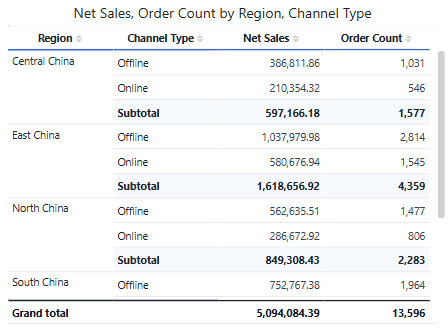
- Add fields to Rows, Columns and Measures. Example: Region and Channel Type in Rows, Net Sales and Order Count in Measures.
- Drag a field between Rows and Columns to pivot it.
Start with one row field and one column field, check the numbers, then add detail. A Pivot table without column fields looks like a Table but keeps pivot features such as subtotals and merged row headers.
Subtotals and grand total
Subtotals are set per row or column field: hover the field, click ⋮ → Show total.
| Field | Dialog | Default name |
|---|---|---|
| First field on the axis (for example Region) | Enable | Total of {field} |
| Inner field (for example Channel Type) | Show a subtotal within each {parent} | Subtotal |
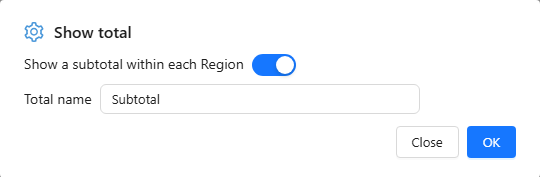
Type a Total name to replace the default.
Then, on Style:
- Sub total → Subtotal at: Top or Bottom of each group, plus background and font.
- Grand total → Grand total turns the overall total row on; Caption defaults to Grand total.
Clicking a subtotal or total cell does not filter other components. Row numbers skip subtotal and total rows.
Two different "Show total" items
On a row or column field, Show total adds a subtotal. On a measure, Show total → Hidden leaves that measure blank in all subtotal and total rows, which is useful for measures that must not be added up.
Layout
| Setting | Where | Notes |
|---|---|---|
| Merge rows | Style → Content | Shows a repeated outer row value once per group. |
| Row headers, Row headers background | Style → Content | Font and fill of the row-field columns. The background can be transparent. |
| Row number | Style → Content | Adds a numbering column (60 px wide). |
| Column size, Row height | Style → Grid | Default widths; drag a header border to resize one column. |
| Column alignment | Style → Content | Per column, listed with the full header path such as 2025 › Net Sales. |
The row-field columns stay frozen while readers scroll sideways, as long as they fit in the component. Fit columns to width is not available on Pivot tables.
Templates, conditional formatting, data bars and icons work as on the Table. See Table Styles and Conditional Formatting.
Totals and known issues
- A ratio or distinct count in a subtotal is recalculated, not summed.
- Do not turn on Show total for the first row field while Grand total is on: both produce the same overall total row.
- Known issue in 10.00: with a subtotal on an inner column field and two or more measures, the subtotal columns do not show every measure. Put that field on Rows, or use one measure.
Related: Table · Tree table · Export