
Appearance
AI Operations and Quotas
The Ops panel of the AI Assistant shows usage statistics and holds the daily question quota.
1. Open Ops
- Click AI Agent in the left navigation, directly below Home.
- Click Ops in the top toolbar. Ops is shown to administrators only.
The panel contains Usage and Quota tabs.
2. Review usage
Use Today, Last 7 days, This month, or Custom to select a period, then click Refresh.
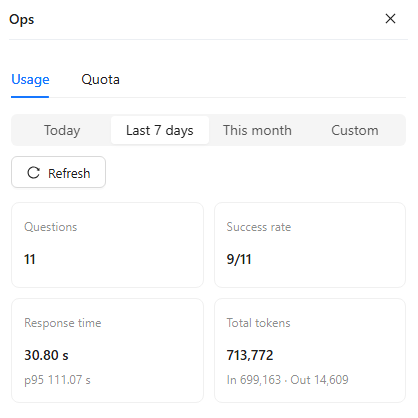
The current summary shows:
- Questions
- Success rate
- Response time and p95
- Total input and output tokens
Use these values to identify usage growth, failed requests, latency changes, and token consumption. They are operational indicators; investigate request details and provider logs before assigning a cause to an anomaly.
For queue monitoring, worker configuration, and a repeatable capacity test, see Managing High Concurrency. The Response time card uses recorded run durations; measure submission-to-answer time separately when evaluating queue waiting.
3. Configure daily question quotas
Open Quota.
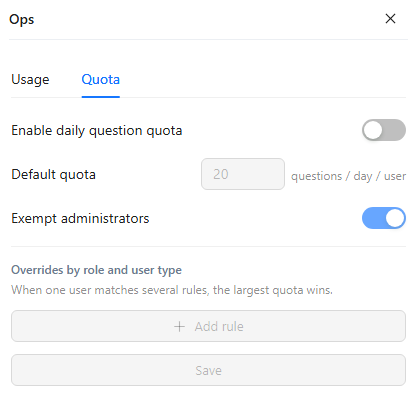
Available controls are:
| Control | Purpose |
|---|---|
| Enable daily question quota | Turns per-user daily question limits on or off. Off by default. |
| Default quota | Sets the default questions per day per user. |
| Exempt administrators | Excludes administrators from the daily limit when enabled. On by default. |
| Overrides by role and user type | Adds more specific quota rules. |
When one user matches several rules, the largest quota wins. Click Save after changing quota settings.
How questions are counted:
- The day follows the server's time zone. The count restarts at midnight on the AI Agent server, not at midnight for each user.
- Failed and cancelled questions are not counted. A question counts on the day it was asked, even if it finishes after midnight.
- Questions asked at the same moment can each pass the check, so a user can exceed the limit by the number of questions still being submitted.
A user who has reached the limit sees:
You have used up the question allowance for today (quota per day). You can ask again after time. Contact your administrator if you need a higher limit.
quota is the user's daily quota, and time is the next midnight of the server, shown in the user's local time. The question is not started.
Daily quotas control usage over a day; they do not cap simultaneous questions or increase processing capacity. Size analysis workers separately using Managing High Concurrency.