
Appearance
Analysis Model Overview
An Analysis Model is the semantic layer between a data source and Datafor reports or AI-assisted analysis. It turns database tables and columns into reusable business objects with consistent joins, names, calculations, formats, and definitions.
What a model contains
| Object | Purpose |
|---|---|
| Table | A source table or database view, or a model-defined SQL View. |
| Relationship | Defines how two tables are joined and the cardinality of each side. |
| Dimension | Groups descriptive attributes used to filter, group, and drill into data. |
| Attribute | A business-facing field such as Store, Product, Status, or Order Date. |
| Hierarchy | Orders attributes into drill paths such as Year → Month → Day. |
| Measure | Aggregates a source field with a method such as Sum, Count, or Distinct Count. |
| Calculated measure | Evaluates a reusable model-level expression at query time and can reference Measures. |
| Business semantics | Adds descriptions, aliases, roles, units, direction, and recommended dimensions. |
| Enterprise metric binding | Connects a model measure to a governed definition in Metrics Library. |
Modeler workspace
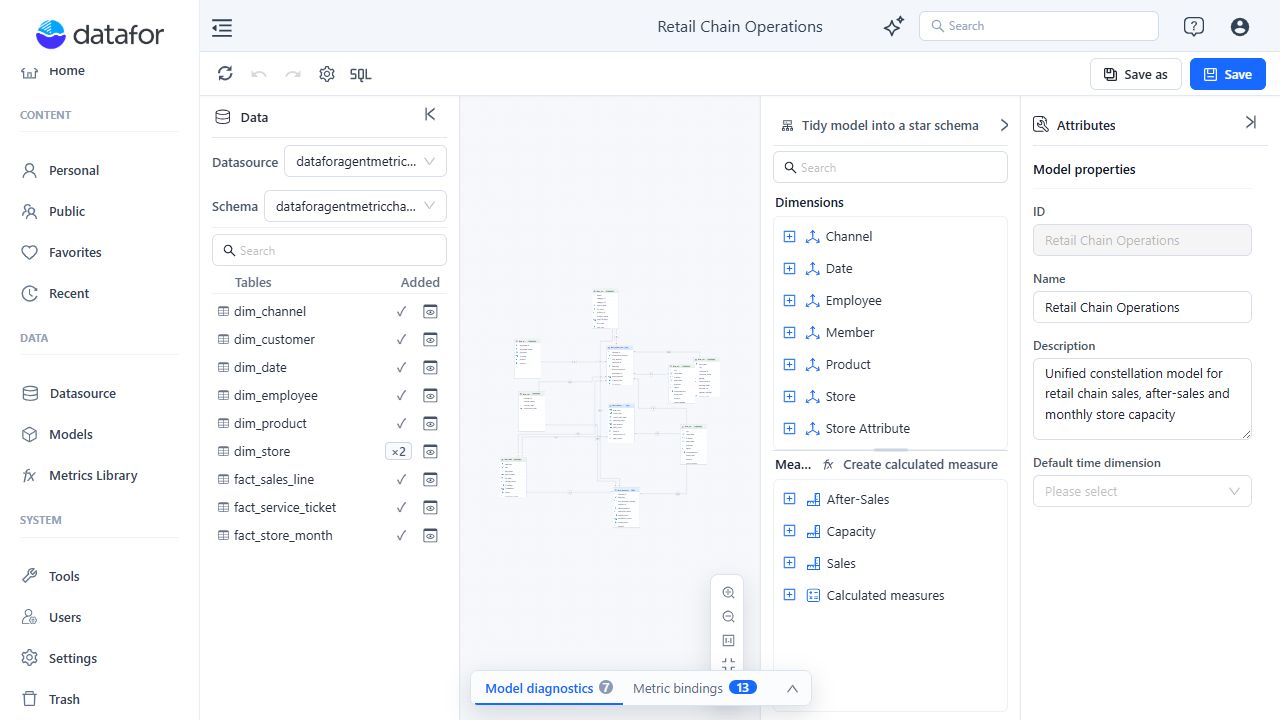
| Area | Use it to |
|---|---|
| Toolbar | Refresh connection metadata, undo or redo model edits, open Data security setting (gear), create a SQL View, and save the model. |
| Data panel | Select a datasource and schema, search tables, preview data, and add tables to the model. |
| Canvas | Inspect tables, arrange the model, and create or edit relationships. |
| Analysis model | Manage Dimensions, Attributes, Hierarchies, Measures, and calculated measures. |
| Attributes | Edit the selected object's core properties, business semantics, advanced settings, and metric governance. |
| Bottom bar of the canvas | Model diagnostics and Metric bindings tabs: review diagnostics and enterprise metric bindings. |
Recommended modeling sequence
- Add only the tables required for the intended analysis.
- Define and verify every relationship.
- Remove semantic objects that do not match each table's role, manually or with a reviewed Tidy preview.
- Build useful Dimensions, Attributes, Hierarchies, and Measures.
- Configure time roles and add business descriptions and other semantic metadata.
- Resolve model diagnostics.
- Save the model and validate representative queries or reports.
Diagnostics detect many structural and semantic problems, but they cannot prove that a join or business definition is correct. Validate important totals against a trusted source before publishing the model.
Related topics
- Managing Analysis Models
- Creating an Analysis Model
- Working with Tables and the Canvas
- Creating SQL Views
- Establishing Table Relationships
- Advanced Relationship Modeling
- Tidy Model into a Star Schema
- Creating Hierarchies
- Time Semantics and Default Time Settings
- Calculated Columns
- Measures and Calculated Measures
- Business Semantics for AI
- Model Diagnostics