
Appearance
Tidy Model into a Star Schema
Tidy model into a star schema reviews the model's relationship cardinalities and current semantic objects, then proposes removing semantic roles that conflict with an inferred star-schema role.
The operation is deliberately limited:
- From a fact-like table, it can remove a Dimension.
- From a dimension-like table, it can remove a Measure Group.
- It leaves tables unchanged when no removal is proposed.
It does not create or edit relationships, change join keys, add tables, rearrange the canvas, or modify source data.
Before running Tidy
Verify every relevant relationship first. Tidy uses the current Key values are unique settings and the resulting 1 and N cardinalities; it does not retest key uniqueness in the datasource.
Also review:
- Which tables should provide Dimensions.
- Which tables should provide Measure Groups.
- Measures that are bound to enterprise metrics.
- Calculated measures that depend on Measures that could be removed.
- Current model-level and Measure-level time settings.
Review and apply the preview
- Click Tidy model into a star schema in the modeler.
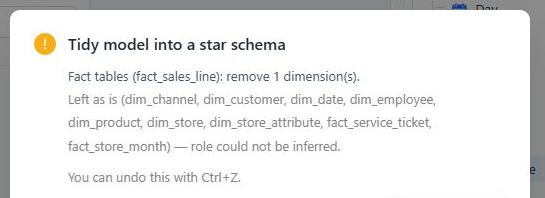
- Review every proposed removal in the preview. Tidy can remove the last Measure Group or Dimension from a table.
- Review Left as is. This section contains tables for which no removal is proposed; it can include already-correct tables as well as tables whose role could not be inferred.
- Click Cancel if a proposed role is wrong. Correct the relationship cardinality or semantic design, then run Tidy again.
- Confirm only when every listed removal is intended.
Validate the result before saving
After applying the cleanup:
- Verify the remaining Dimensions, Measure Groups, Measures, and calculated measures.
- Review the model's Default time dimension and every Measure's Default time field.
- Open Metric bindings and verify any enterprise metrics associated with removed Measures.
- Resolve relevant Model diagnostics issues.
- Validate representative totals and drill paths, then save the model.
When a removed Measure has a Metrics Library binding, the modeler requests an unbind. That request can fail independently of the editor change. Treat the registry separately from editor history: Ctrl+Z can restore the editor draft, but it does not restore an external Metrics Library binding. Always recheck Metric bindings after applying or undoing Tidy.
When not to use Tidy
Do not use Tidy as an automatic model-design step for an unverified schema. It cannot determine whether join keys are correct, resolve an intentional many-to-many design, or decide which business Measures and Dimensions users need. Model those cases explicitly and use diagnostics plus result validation.