
Appearance
Empty Data and Error Messages
A component that has nothing to draw says why, in grey text in the middle of the component.
Empty results
| Message | Cause | Buttons |
|---|---|---|
| No data under the current filters | A filter, a parameter or a value passed in the URL leaves no rows. | View conditions lists the conditions. |
| No data under the current link conditions | A click on another chart (cross-filtering) leaves no rows. | Clear links, View conditions |
| No data (or your own text) | The query returns no rows without any condition. | – |
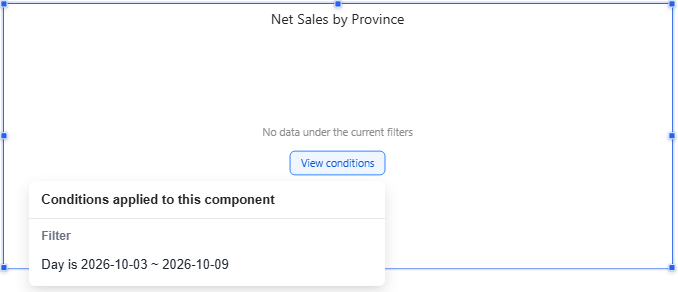
Some charts have their own empty state: a pie whose values are all 0 shows a grey ring All values are 0; a gauge or ring progress without data shows the message instead of an empty scale.
Set the empty-data message
| Level | Where | Applies to |
|---|---|---|
| Component | Style → Empty data | This component |
| Page | Page → Style → Empty data | Components that have no setting of their own |
| System | Settings › General › System configuration › Reports › Empty data message | New reports |
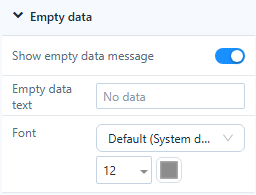
- Show empty data message: when off, the component stays blank for readers (authors still see a faint message).
- Empty data text: leave empty for No data in the reader's language.
- Font: size and colour of the message.
A Measure card can show a placeholder instead: Style → Empty data → Show blank main value as.
Errors
| Message | Cause | What to do |
|---|---|---|
| The query timed out. Narrow the filters and try again | The query took longer than the engine's query timeout. | Narrow the filters, or ask an administrator to check the model or the timeout. |
| You don't have permission to view this data | The user may not read the model or its data. | Ask for access. |
| A field used by this component no longer exists | A field or member was renamed or removed in the model. | Replace the field on the Data tab. |
| Failed to load data | Any other error. | Click Retry. |
Retry appears for time-outs and other errors. Authors also get Details, which shows the server's error text; readers never see it.
Truncated results
When a query returns more rows than the page's Max query records (Page → Settings → Performance, default 5,000), the component shows the first rows and a warning icon in its bottom-right corner: Showing the first {shown} of {total} rows. Add a filter or a row limit, or raise the limit.
Which setting do I need?
| Situation | Setting |
|---|---|
| The whole result is empty | Empty data message (this page) |
| Some cells are empty | Empty values as on the measure, see Table |
| Members without data should still appear | Show Items with No Data |
Related: Page Settings · Component Filters