
Appearance
Datasets and Parameters
A paginated report gets its rows from datasets and lets readers narrow them with parameters. A parameter does not filter anything by itself: a model dataset carries filters that read parameter values, and an SQL dataset binds ${parameter} placeholders. One parameter can drive several datasets.
Datasets
Datasets are listed at the top of the Data tab. Each row has buttons to show its filters, Run it (fetch the fields and sample rows), Edit it and delete it. The table or crosstab of the report, the choice list of a parameter and the fields in the header or footer all name the dataset they read from.
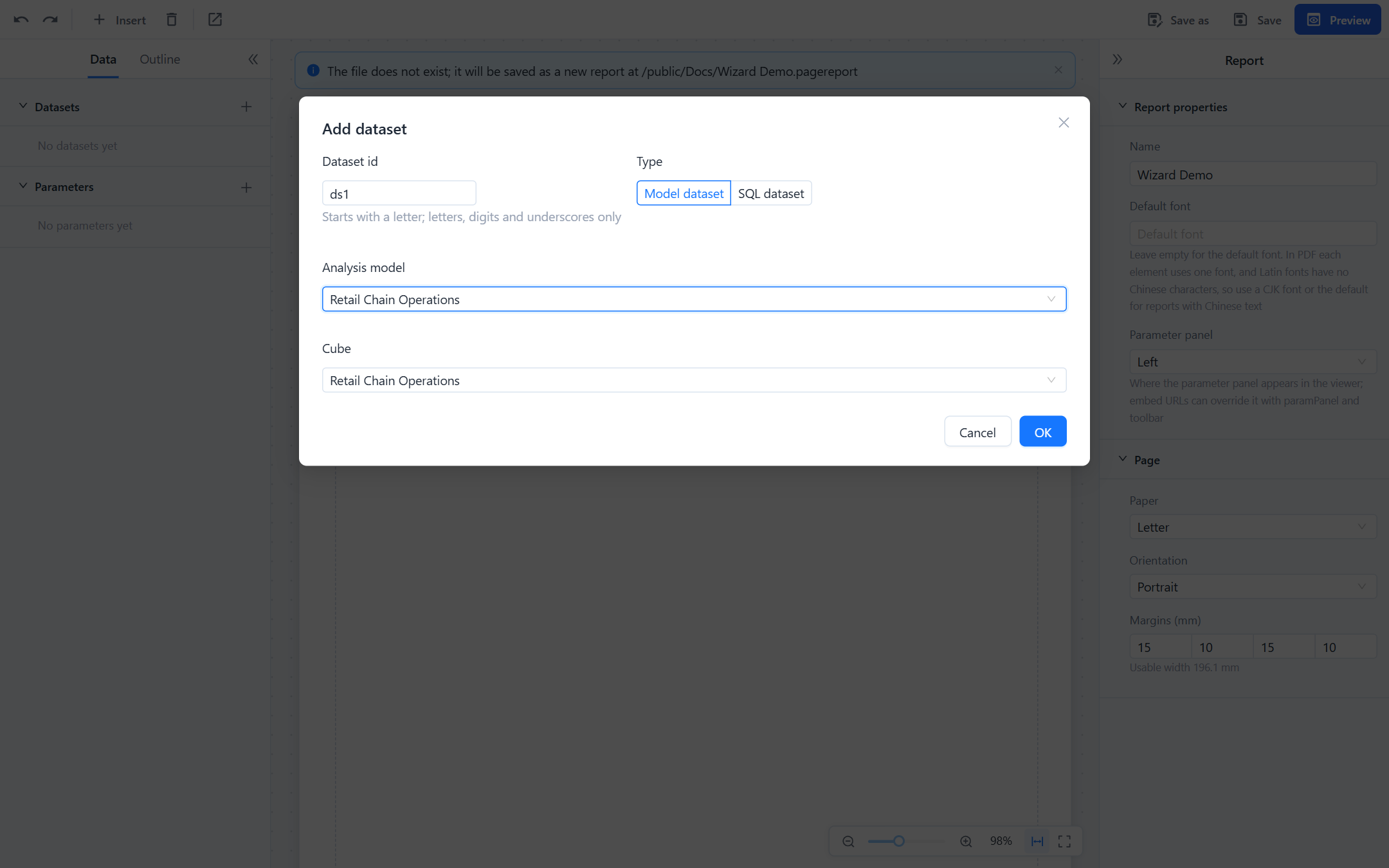
Model dataset
A model dataset reads an analysis model through the same engine as dashboard charts. Choose the model and its cube; the field tree then shows the model's dimensions (with hierarchies, levels and attributes) and its measures and calculated measures. You do not write a query: the designer builds it from the fields you place on the report, and the dataset returns one row per combination of the dimension fields in use.
- Row-level security and the model's permissions apply to the reader who runs the report.
- Date hierarchy levels come back as text such as
2025,2025-Q3,2025-08or2025-08-15. - Measures keep the model's aggregation. Sums and counts can be re-totalled by the report; averages, distinct counts and calculated measures should be totalled By model (see Tables and Crosstabs).
- Suited to summaries. A model dataset is calculated and held in memory as one result and exports at most 100,000 rows; long detail listings belong in an SQL dataset.
- Needs the dashboard plugin on the server; without it the dialog says Visualizer is not installed; model datasets are unavailable.
Filters
A model dataset's Filters table (dataset dialog, or the filter button next to the dataset) holds conditions on hierarchy levels:
| Filter | Value | Behaviour |
|---|---|---|
| Is one of | Fixed member names, or a parameter | Keeps the members listed. Member names must match exactly. |
| Date range | From and To, each a date or a parameter | Keeps the days between the two, inclusive; one end may be empty. |
A filter whose parameter has no value is skipped, so an optional parameter means "no filter", not "no rows". The quickest way to create a filter and its parameter together is the field's context menu:
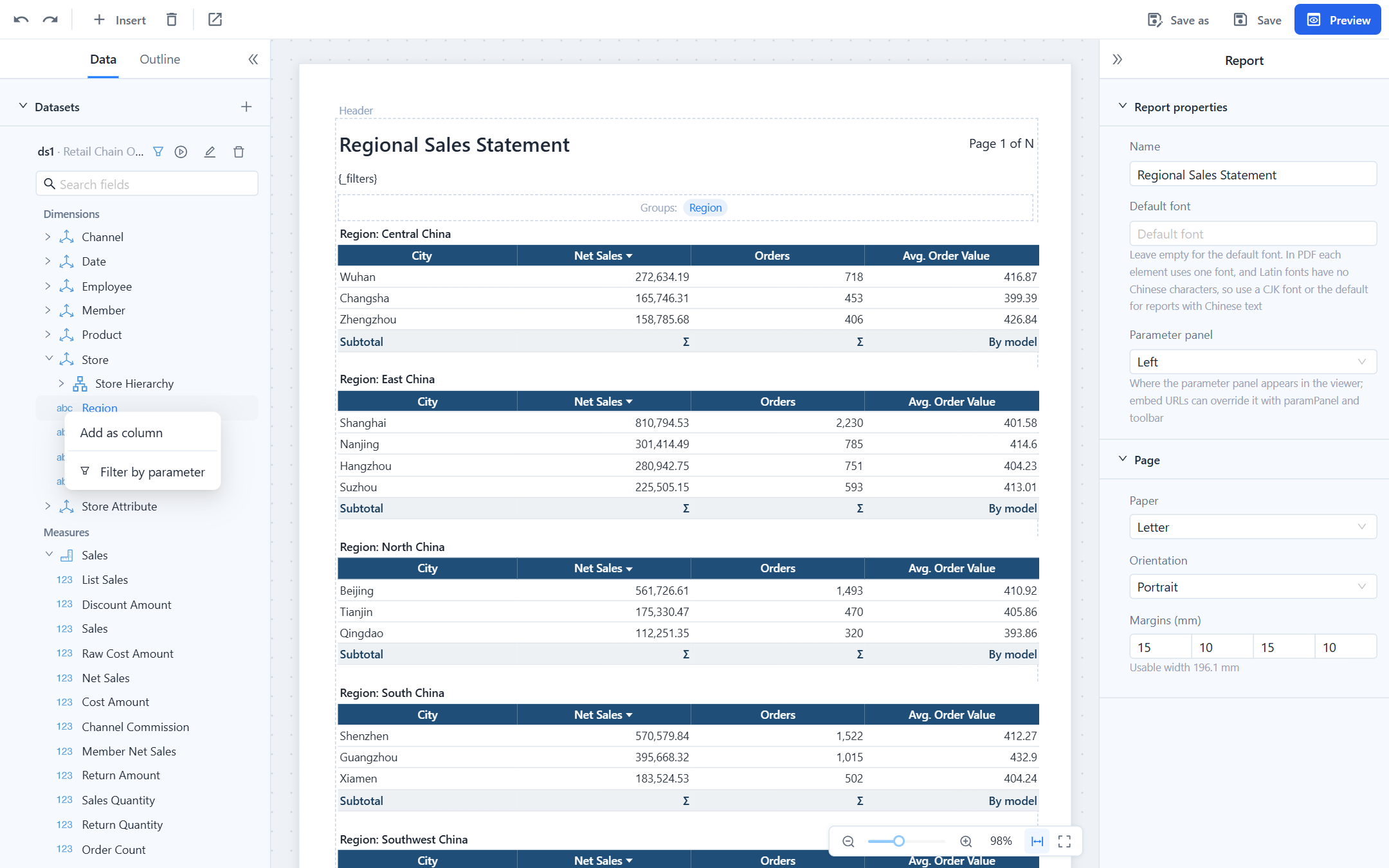
- Filter by parameter on a level or attribute creates a list parameter with that level's members as choices and adds an Is one of filter that reads it.
- Filter by date range parameters on a date level creates two date parameters,
<field>_fromand<field>_to, and a Date range filter. The viewer shows the pair as one date range picker.
Renaming or deleting a parameter updates or removes the filters that reference it.
SQL dataset
An SQL dataset runs the SQL you write on a database connection from Datasource. Run executes it with the current parameter values and shows the fields and sample rows; the field names are the result's column names.
select region, city, order_date, amount
from sales
where order_date >= ${startDate}
[[ and region in (${regions}) ]]${name}is bound as a query parameter. It may stand only where a value can stand, not in place of a table or column name.- A list parameter expands to
?, ?, ?, soin (${regions})works. - Wrap a condition in
[[ … ]]to drop it when any parameter inside has no value. Without the brackets an empty parameter bindsNULL, andregion in (NULL)returns no rows. - You need read permission on the connection; readers of the report need it too.
- Up to 200,000 rows can be exported from an SQL dataset.
Parameters
Parameters are listed under Parameters in the Data tab. Click one to edit it in the property panel.
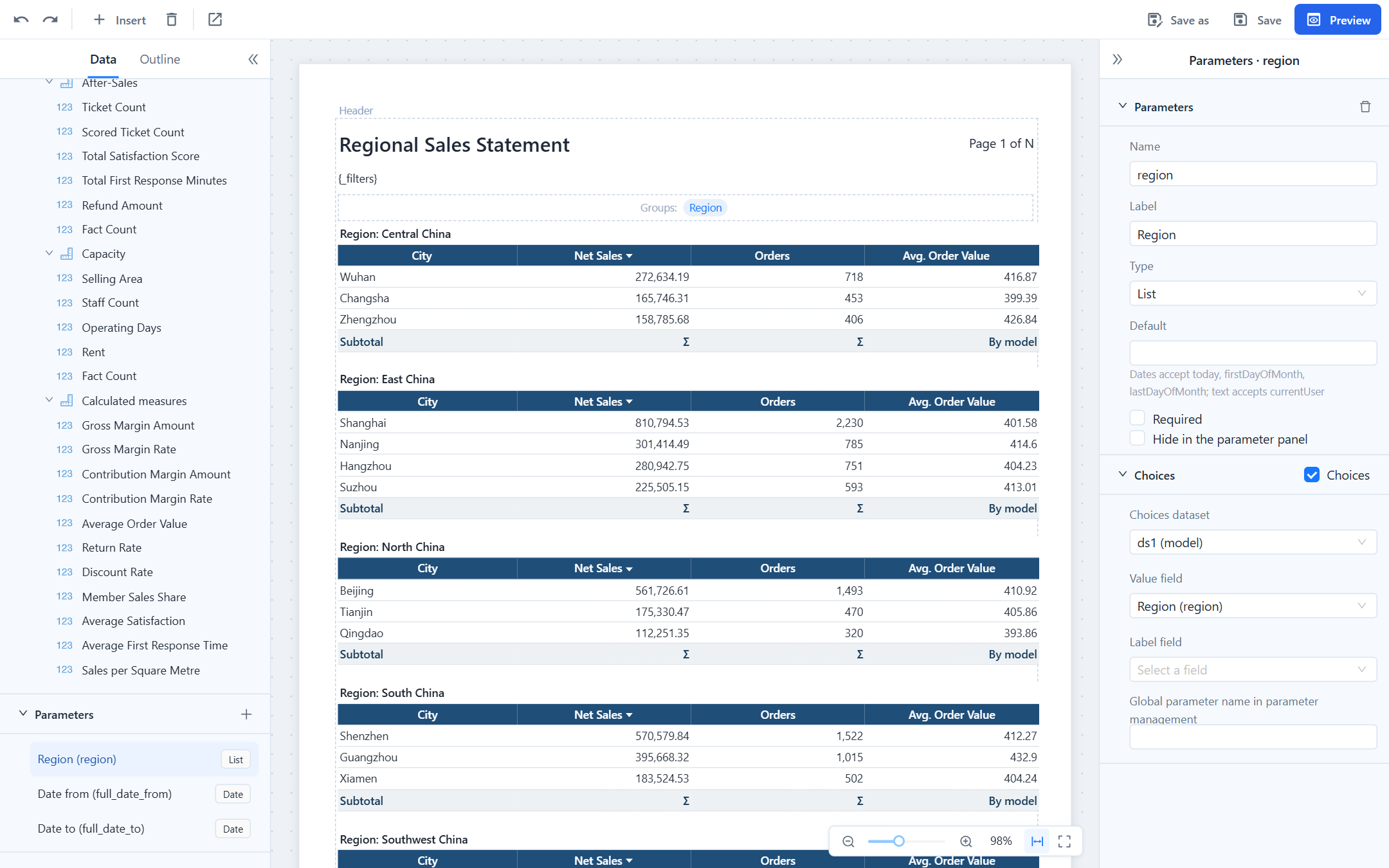
| Property | Meaning |
|---|---|
| Name | Used in ${name}, {name}, URLs (p_name) and lists. Letters, digits and underscores, starting with a letter. |
| Label | What readers see in the parameter panel and in {_filters}. |
| Type | Text, Number, Date, Date time, Yes/No or List (several values). |
| Default | A literal, or for dates today, firstDayOfMonth, lastDayOfMonth; for text currentUser. |
| Required | The report does not run until the parameter has a value. |
| Hide in the parameter panel | The parameter is not shown; its value comes from the URL (p_name), a distribution or the default, and it is left out of {_filters}. A hidden required parameter without a default produces a validation warning. |
| Choices | A dataset, a Value field and an optional Label field. Readers pick from a list instead of typing. Without choices the parameter is free input. |
| Global parameter name | Takes the definition and choices from a parameter in Parameter Management; local settings override it. |
Two behaviours are worth knowing:
- Cascading. When the choices dataset is filtered by another parameter (an SQL choices query containing
${country}, or a model dataset whose filter readscountry), the list is reloaded when that parameter changes, and the dependent parameter is cleared. Model datasets fetch the choices of a level directly, so the list stays complete and fast. - Multi-value lists. A list parameter with choices gets Select all and Clear in the viewer; left empty it shows All and does not filter. In a URL repeat the key:
p_region=East&p_region=North.
Placeholders in text
Text blocks and header or footer text can show parameter values and totals:
| Write | Shows |
|---|---|
{region} | The parameter's display label (its choice label when it has one), several values separated by commas, All when empty; dates as 2026-10-27, date-times as 2026-10-27 09:30, yes/no as Yes/No. |
{_filters} | All visible parameters as Label: value; Label: value. The designer adds a {_filters} text block above the table when you create the first parameter, so readers see what the pages were filtered by; move it to the header if you want it on every page. |
{_user} | The signed-in user. In a distribution, the distribution's owner. |
{=Sum(amount)}, {=Count()}, {=Avg(x)}, {=Min(x)}, {=Max(x)} | A total over the whole dataset, so it can stand above the table or in the header. |
{=Now()} | Date and time of rendering, yyyy-MM-dd HH:mm. |
{=Format(Sum(amount), "#,##0.00")} | A formatted value; If(cond, a, b), Param("name"), Field("name"), User() are also available. |
A lone total is shown as #,##0.## and a lone Now() as yyyy-MM-dd HH:mm; use Format() for anything else. An expression that does not parse is reported by validation and printed as written. Field names are written as they appear in the dataset, without brackets.
Parameters from outside the viewer
- URL:
…/viewer?p_region=East%20China&p_startDate=2026-01-01. See Viewer URL parameters. - Drill-through from a dashboard: the dialog maps the clicked fields to report parameters. See Drill Through to a Paginated Report.
- Distribution: stored with the distribution or taken from a list row. See Distribution.
Dates sent from outside must be yyyy-MM-dd (date-times yyyy-MM-dd HH:mm:ss, a T is also accepted); invalid dates such as 2026-02-30 are rejected.