
Appearance
Understanding Lineage
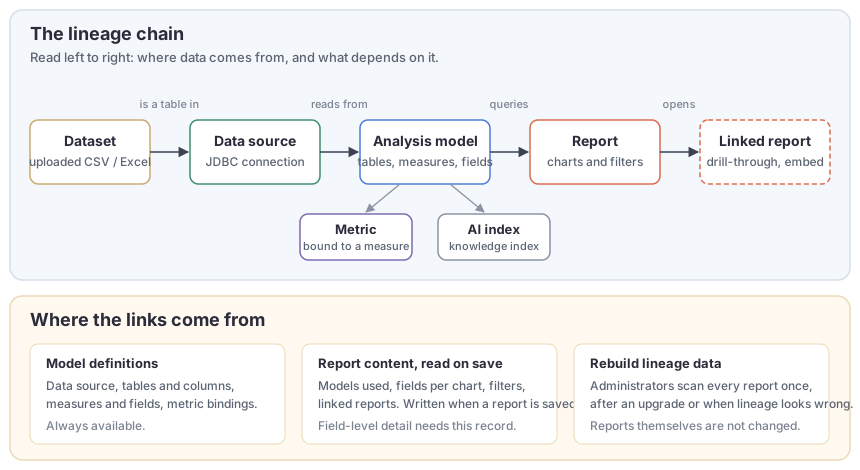
Lineage is the record of which objects depend on which: a report queries analysis models, a model reads from a data source, and an uploaded file sits behind a data source as a table. Datafor keeps this record for you and shows it in three places:
- Data › Lineage, a page that lists every model, data source, report, dataset and metric you can see, flags broken or unused objects, and draws the lineage of the selected one. See The Lineage Page.
- View item lineage, a graph you open from one report, model or data source. See Viewing an Item's Lineage.
- Usage and impact, in the modeler and in every delete or change confirmation: which reports use this measure, and what breaks if you remove this table. See Usage and Impact Analysis.
In short
Lineage answers two questions before you change something: where does this number come from? and who will notice if I change it?
What is recorded
| Object | Where it comes from | What lineage knows about it |
|---|---|---|
| Dataset | A CSV or Excel file uploaded under Datasource › Datasets | The connection it was loaded into, how many files and tables it has, which models use those tables |
| Data source | A connection in Datasource | Database type, the models that read from it, the datasets loaded into it |
| Model | An analysis model in Models | Its data source, its tables and columns, every measure, calculated member and attribute, the metrics bound to it, its AI knowledge index |
| Report | A .datafor file in Public or a personal folder | The models it queries, the fields each chart and filter uses, the reports it opens through drill-through or embeds as a page |
| Metric | A metric in Metrics Library | The models whose measures it is bound to, its status (Certified or Draft) |
| AI index | A knowledge index built with Prep data for AI | The model it indexes and its status |
Only components that run a query count. A text box, an image or a navigation button does not make its report depend on a model, so a page that holds nothing else is listed as not using a model. That is a statement, not a problem.
Where the links come from
Three sources feed the record, and they differ in how complete they are.
- Model definitions. Datafor reads the model's data source, tables, measures and bindings directly from the saved model. This part is always current.
- Report content, read when a report is saved. Since 10.00, every save of a report extracts the models it uses, the fields behind each chart (measures, hierarchies, filters, calculated members) and the reports it links to, and stores them with the file. Import does the same. Only reports with this record can take part in field-level answers such as "which charts use Net Sales".
- Rebuild lineage data. Reports saved before the upgrade have no field-level record. An administrator runs Rebuild lineage data on the Lineage page once; it scans every report and writes the record without changing the reports. Until that happens, impact lists say how many reports could not be assessed.
Links follow the file, not its name. When a linked report is renamed or moved, the link stays and the graph shows Previously <old path> on the target until the source report is saved again.
Who sees what
Lineage never shows you an object you could not open yourself:
- Reports are taken from Public and from your own personal folder. Administrators also see reports in other users' personal folders, and can turn that off with Include other users' personal folders.
- Models and data sources you cannot read still appear when a report you can see uses them, marked No permission; their details stay hidden. A model that was deleted appears as Deleted.
- Datasets are listed only when you can read the connection they belong to.
- Metrics and AI indexes follow the Metrics Library and AI settings permissions.
Because of this, a non-administrator can never conclude that a model is unused: a report in someone else's personal folder may be using it. Datafor therefore shows Models no report uses and the Unused label only to administrators looking at all folders, and impact lists for other users end with Based on the reports you can see.
When the record updates
- The Lineage page and graphs read a snapshot that Datafor keeps per user for a few minutes. Saving, renaming, moving or deleting a report or model refreshes it at once; Refresh on the Lineage page re-reads it on demand.
- The modeler's Usage section is based on the last saved version of the model. A measure you have added but not yet saved cannot be used by any report.
- Rebuilding lineage data is a background job. You can close the dialog and come back; only one rebuild runs at a time.
What lineage does not do
- It does not track columns inside SQL views or calculated columns back to the physical table. A table is "used" when any measure or attribute built on it is used.
- It does not follow a URL drill-through to an external site, only links between reports in this Datafor.
- It does not include the reports embedded in other systems or opened through share links; those are ordinary reports and appear under their folder.
- It does not stop a delete. Impact lists tell you what will break; the decision stays with you.