
Appearance
Drill through
Drill through opens a detail report or a web address from a value the reader clicks, and passes the clicked member along: click East China in a summary and the store report opens filtered to East China.
Set it up
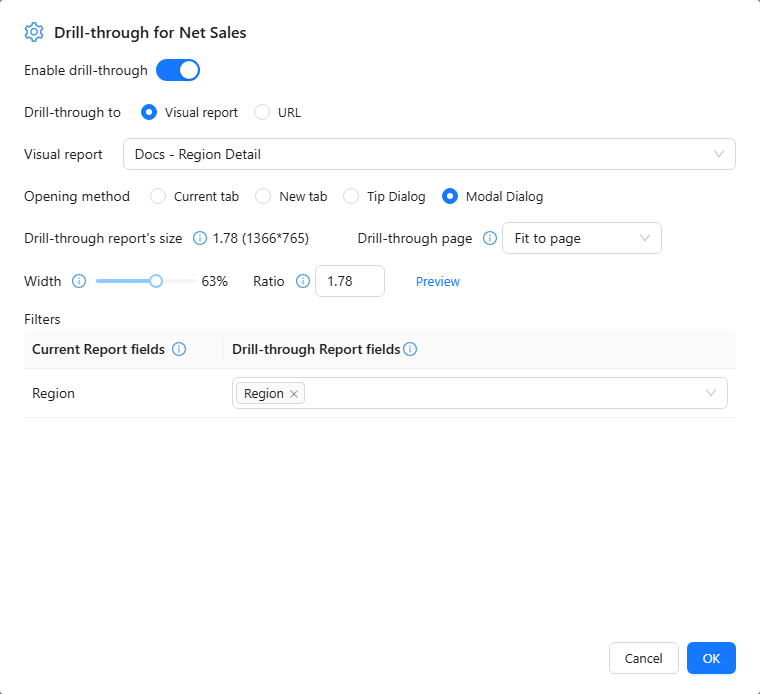
- Select the component, hover the measure field in Data (for example Net Sales) and choose ⋮ → Drill through. Readers then drill through by clicking a data point.
- Turn on Enable drill-through.
- Choose Drill-through to: Visual report (pick the report) or URL (enter the Address).
- Choose the Opening method: Current tab, New tab, Tooltip or Pop-up. For these two set Drill-through page, Width and Ratio.
- Under Filters, map Current Report fields to Drill-through Report fields, for example Region → Region and Year → Year.
- Click OK and test with two different members.
URL placeholders
A URL Address can contain placeholders that are replaced by the clicked row, URL-encoded:
| Placeholder | Replaced by |
|---|---|
{{Region}} or {{[Store].[region].[region]}} | The member of that field in the clicked row (by caption or unique name) |
{{value}} | The raw value of the clicked cell |
{{formatted}} | The displayed value of the clicked cell |
Example: https://crm.example.com/accounts?region={{Region}}&sales={{value}}. {{value}} and {{formatted}} are filled when the click comes from a Table or Pivot table cell. Missing values become empty. Only http, https and relative addresses are accepted.
How readers use it
- Tables and pivot tables: click the cell.
- Charts: point to the chart and turn on the drill-through button in its toolbar (Turn on drill through: click a data point to open the target report), then click a data point. Only one of drill-down and drill-through is on at a time; with both off, a click filters other charts.
- Right-click → Drill through opens the target from the data point menu, without turning anything on.
The target report lists the passed values under Passed in → Passed from jump in each component's Conditions. A pivot table click that opens a drill-through does not also filter other charts.
Checks
- The reader needs permission to open the target report.
- An unchanged target after clicking two different members usually means a missing or wrong field mapping.
- Drill down changes the level inside the same chart; drill through opens a different report.