
Appearance
System Configuration
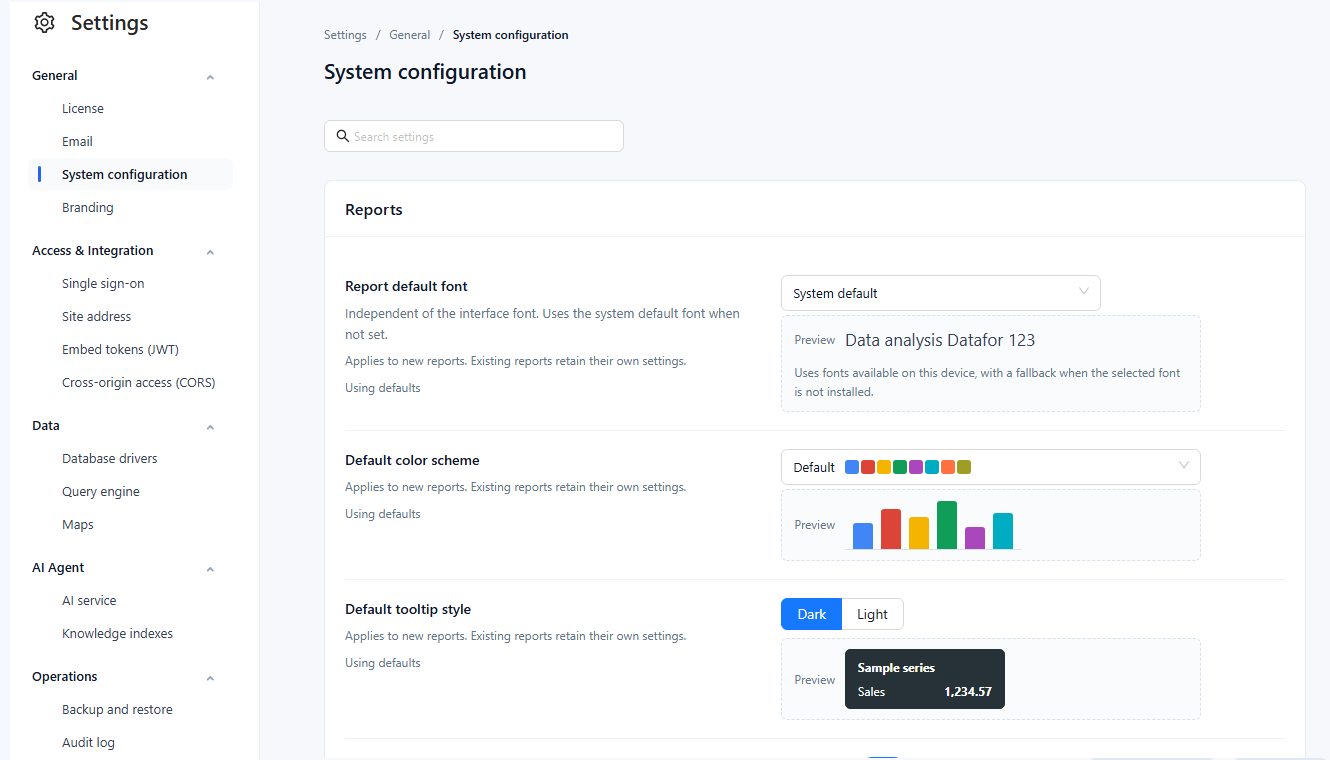
Settings › General › System configuration holds tenant-wide defaults. Only administrators see it.
Settings
Some settings only seed new reports or models; others apply to all reports after they are reopened.
| Group | Setting | Default | Applies to |
|---|---|---|---|
| Reports | Report default font | System default | New reports. Independent of the interface font. |
| Default color scheme: Default, Classic, Color-blind friendly, Pastel, Paired, Dark | Default | New reports | |
| Default tooltip style: Dark, Light | Dark | New reports | |
| Empty data message: Show and Text (up to 100 characters) | Show on, text empty | New reports. Empty text shows No data in each viewer's language. | |
| Modeling | Default measure format: Number (#,##0, #,##0.0, #,##0.00) and Percentage (0%, 0.0%, #,##0.00%) | #,##0.00 and #,##0.00% | New measures, after reopening the modeler. Number is used for new measures and calculated measures; Percentage only for a calculated measure created from a Metrics Library metric whose unit is %. |
| Default model cache expiration (seconds, 0 = never) | 0 | New models, after reopening the modeler | |
| First day of the week: Monday, Sunday | Monday | All reports after reopening: "this week", "last week", date pickers, calendar chart. Match the model's week definition. | |
| Queries and refresh | Default chart query row limit (100–200,000 rows) | 5,000 | All reports after reopening, unless the page sets its own Max query records |
| Minimum auto-refresh interval (1–86,400 s) | 2 | All reports, including shared and embedded ones: shorter refresh intervals run at this value | |
| AI Agent | Auto-build knowledge index | On | Later model saves and uploads (see below) |
New reports store the Reports values on their first Save or Save as; changing them here later does not change those reports. New reports also start with the table style Minimal, which is not configurable here.
Query timeout and concurrency are on the Query engine page, linked from Queries and refresh. Reports wait for a query for the engine's query timeout plus 10 seconds.
Auto-build knowledge index
With the switch on, saving a model in the modeler (also Save as), copying a model or importing a new model in a ZIP builds or updates its AI knowledge index in the background, as the user who saved. Failures do not block the save; follow progress in Settings › AI Agent › Knowledge indexes. Renaming a model does not trigger a build, and switching the option on does not rebuild existing indexes.
Working on the page
- Search settings filters the rows by name and description.
- Each row shows Using defaults or Custom; a changed row shows its default and Restore default.
- Save sends only the changed settings; Discard changes drops them. Leaving the page with unsaved changes asks Keep editing, Discard changes or Save and leave.
- If another administrator saved in the meantime, nothing is overwritten: the latest values are loaded with your edits kept, and you review them before saving again.
- With Settings › Operations › Audit log recording System settings changes, every saved change is logged with its old and new value.
Settings are stored per tenant.
Related: Settings Overview · Page Settings · Fonts