
Appearance
Common Questions
Common Questions lets administrators maintain reusable, user-facing questions for each analysis model. The questions provide a controlled starting point for common analytical tasks without replacing the model's metrics, metadata, or permissions.
1. Open Common Questions
- Click AI Agent in the left navigation, directly below Home.
- Click Common Questions in the top toolbar. Common Questions is shown to administrators only.
- Select an Analysis Model.
The list is scoped to the selected model and can be searched by question content.
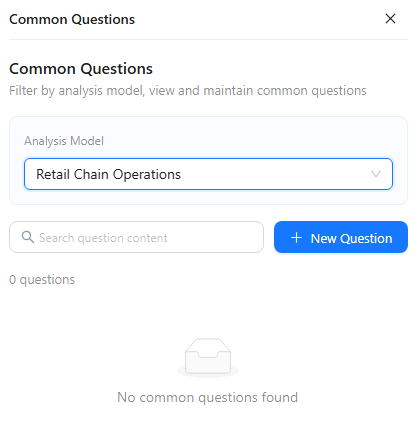
2. Add a question
Click New Question. Select the target analysis model and enter the user-facing question (up to 500 characters), then click Save.
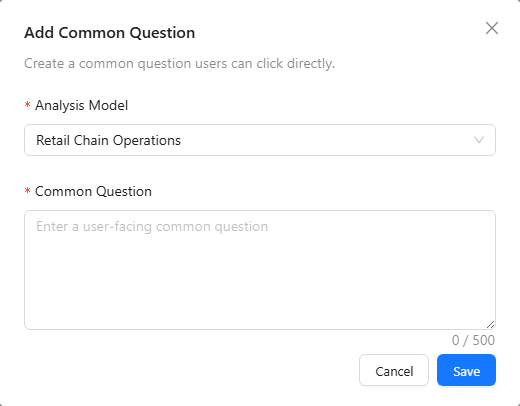
Write questions that can be answered from the selected model. Include a clear metric, grouping, comparison, or time basis when needed.
Examples:
Which product departments have the highest margin?How does margin vary across store types?Compare units ordered with units shipped by warehouse class.
3. Where users see them
When a user selects the model, its welcome card shows four suggested questions under You can ask. The lightbulb Common Questions panel shows the same list.
- Configured questions come first, up to all four places.
- The remaining places are filled with questions generated by the Agent from the model's metrics and dimensions.
- Users can click Regenerate to replace the generated questions with a new batch. Configured questions stay. Generated questions are cached for seven days per model and interface language and are shared, so a regenerated batch replaces them for every user of that model and language.
- With four configured questions, Regenerate is not shown.
4. Maintain the list
For an existing item, use the row actions to edit or delete the question. Use the analysis-model filter before editing to avoid changing a similarly worded question that belongs to another model.
Writing guidance
- Do not hard-code a time period that will quickly become stale unless that fixed period is intentional.
- Test the question in New Chat with the same analysis model before saving it.